
Application Build 3.6 and UC 3.3
May 2026
Overview / Summary
Release 3.6 delivers enhancements across identity governance, analytics, privileged access management, and overall platform usability. Identities in the Pending status can now be activated through the Identities Update request. Credentials check-out in My Access has been enhanced with additional configuration options and expanded audit logging. Integration administration has been strengthened through the adoption of Analytics-style grids, support for calculated tag columns, and the introduction of historical record tracking for integration changes and activity. Analytics introduces new operators and data visualization options. The Details and Workgroups pages for identities have also been updated to provide clearer visibility. Overall, these enhancements improve operational efficiency and auditability across the platform.
Key feature enhancements include:
- Identities: Pending identity status management
- Integrations: Enhanced grids, tagging, and integration history tracking
- UX/UI Updates: Improved Identity Details and Workgroup user experience
- Requests: Usage period controls for privileged account access
- Analytics: In Next Days forecasting and access creep analysis
- Obi: Permission-based access controls and audit logging for AI capabilities
- Check-Out\In: Automatic check-in and extended credential activity history
New Features & Enhancements
Pending Identity Status Management
The Identities Update request can now be used to re-evaluate the identity's current state, reconcile lifecycle status, and resume any incomplete provisioning activities.
-
This capability helps address scenarios in which identity onboarding occasionally remains in a pending provisioning state due to high system workload, workflow dependencies, concurrent request execution, or interruption of long-running processes such as Data Import, HR Source Check, or Onboarding operations.
-
The Identities Update request enables recovery of identities that are stuck in a pending state and ensures that the intended access assignments are provisioned successfully.
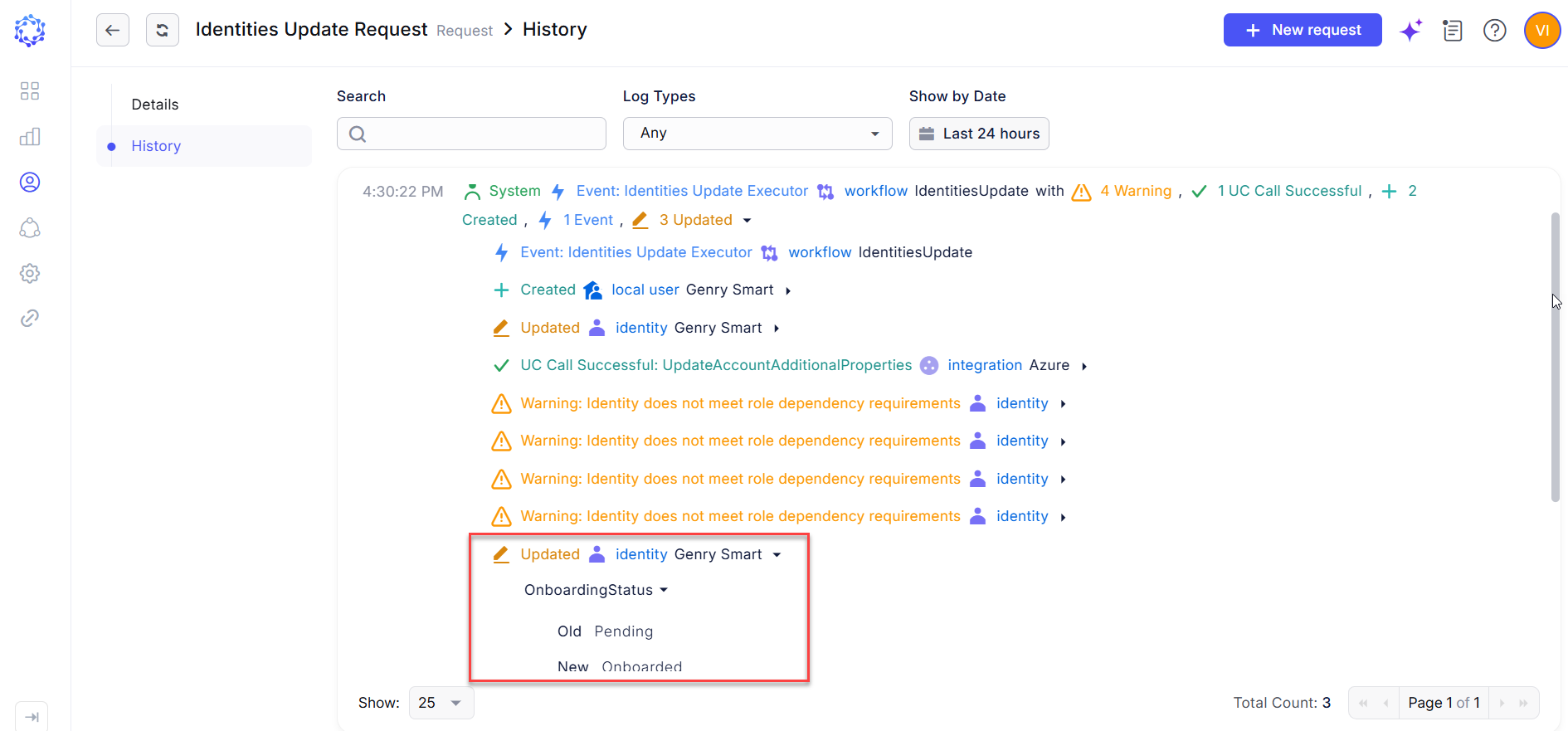 Pending status evaluation
Enhanced Integration Grids, Tagging, and History Tracking
The Integrations area has been modernized with Analytics-style grids across key integration datasets, including Accounts, Entitlements, Resources, Resource Identities, Implicit Entitlements, and other integration-specific views.
-
These grids now support advanced filtering, customizable columns, saved views, and CSV export, providing a more consistent and powerful data analysis experience.
-
To further enhance data classification and governance, Tag-based attributes are now available throughout integration datasets. Tag columns support inheritance-aware visibility, allowing users to view both directly assigned and inherited tags where applicable. This provides additional context for categorization, reporting, and access analysis.
-
In addition, each integration now includes a dedicated History page that tracks integration-specific events and operations. Administrators can review configuration changes, execution activities, and operational events for a given integration, improving visibility, troubleshooting, and auditability.
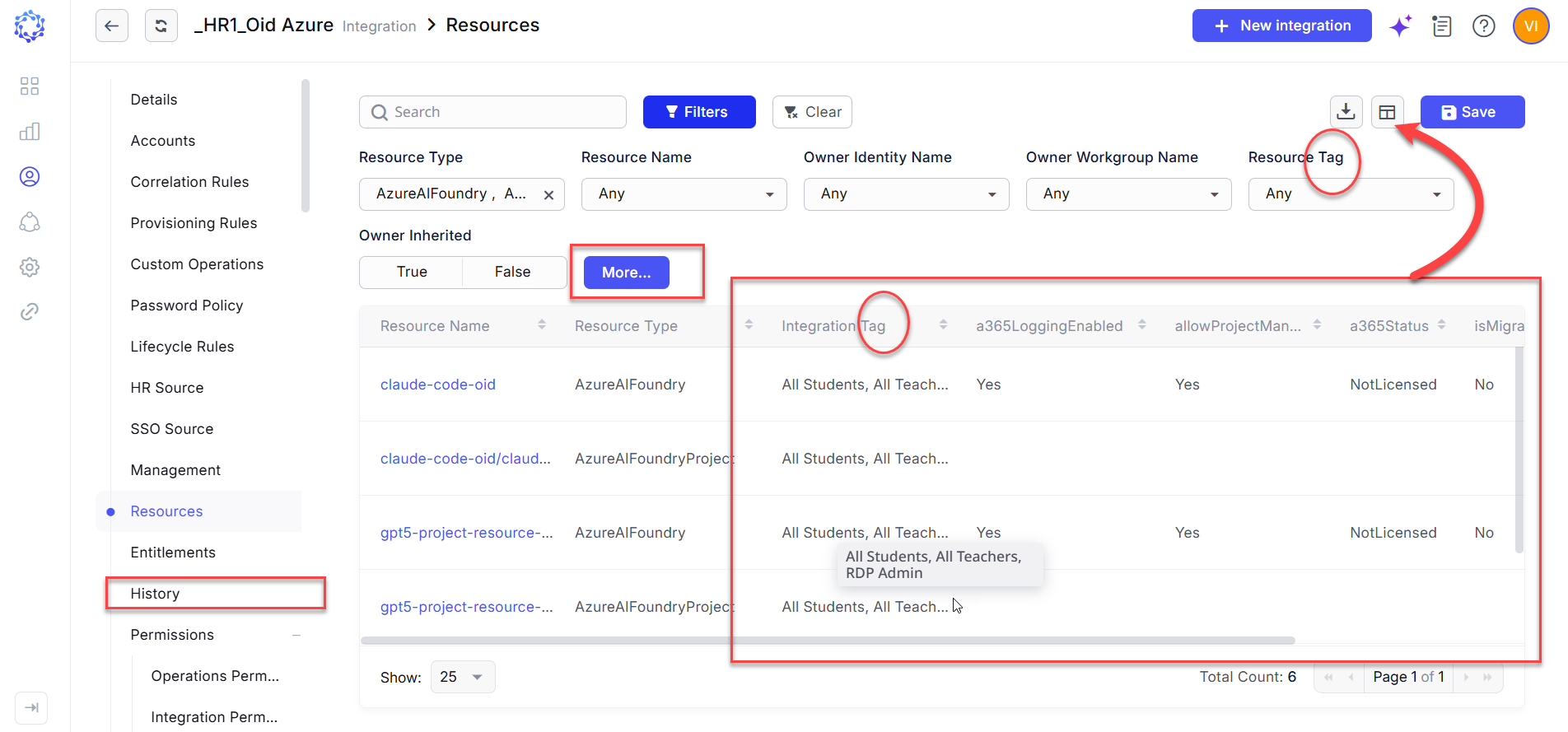 New capabilities in the Integrations area
Improved Identity Details and Workgroup User Experience
As part of ongoing UX/UI enhancements, the Identity Details and Workgroup pages have been redesigned to improve information visibility and navigation.
-
The Identity Details page now presents identity attributes in a more structured and organized format, making it easier to review identity information and lifecycle status. Visual indicators have also been enhanced to clearly distinguish active and terminated identities.
-
The Workgroup page has been updated with a more streamlined layout and improved visibility into workgroup membership. Membership counts are now displayed prominently, facilitating more efficient access administration.
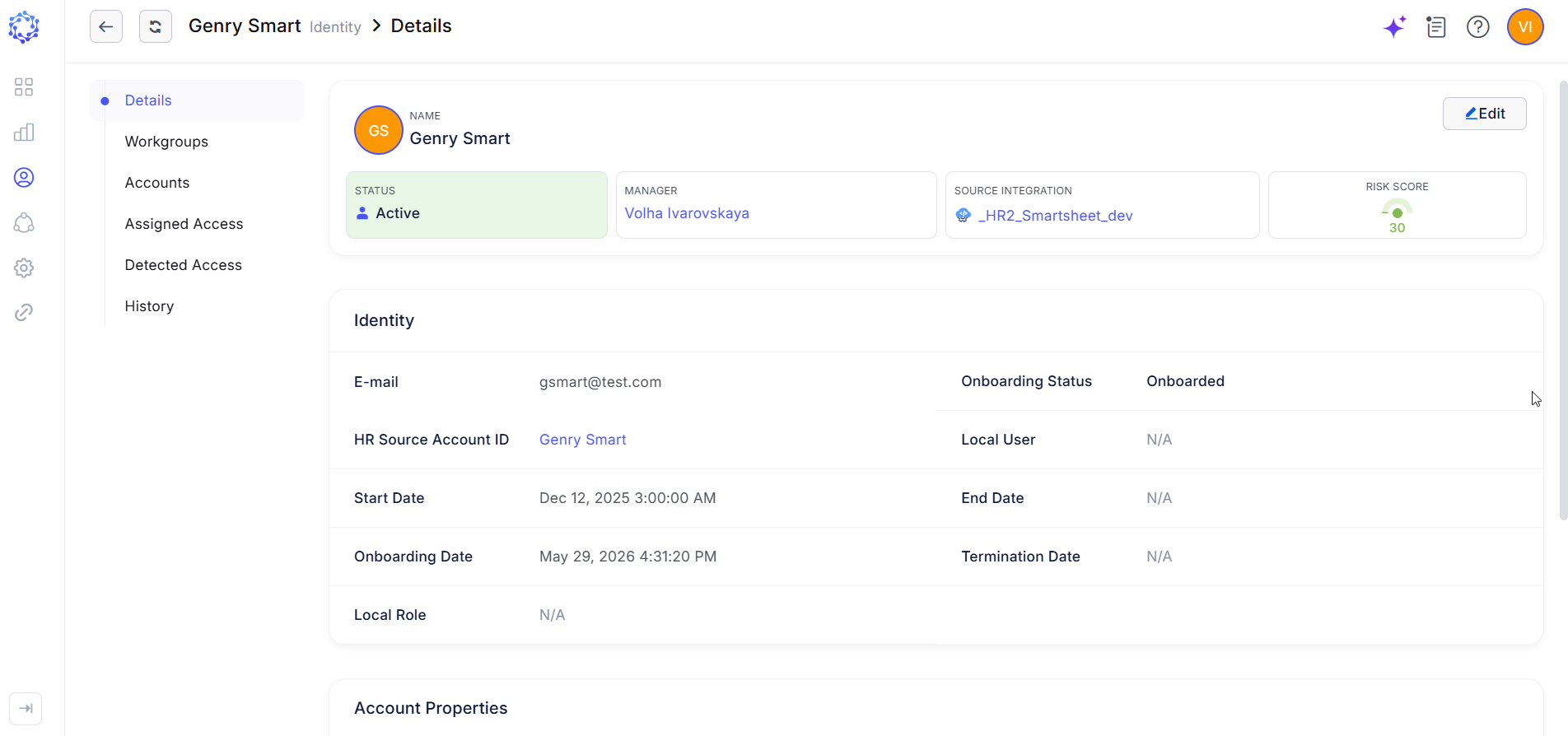 Details page
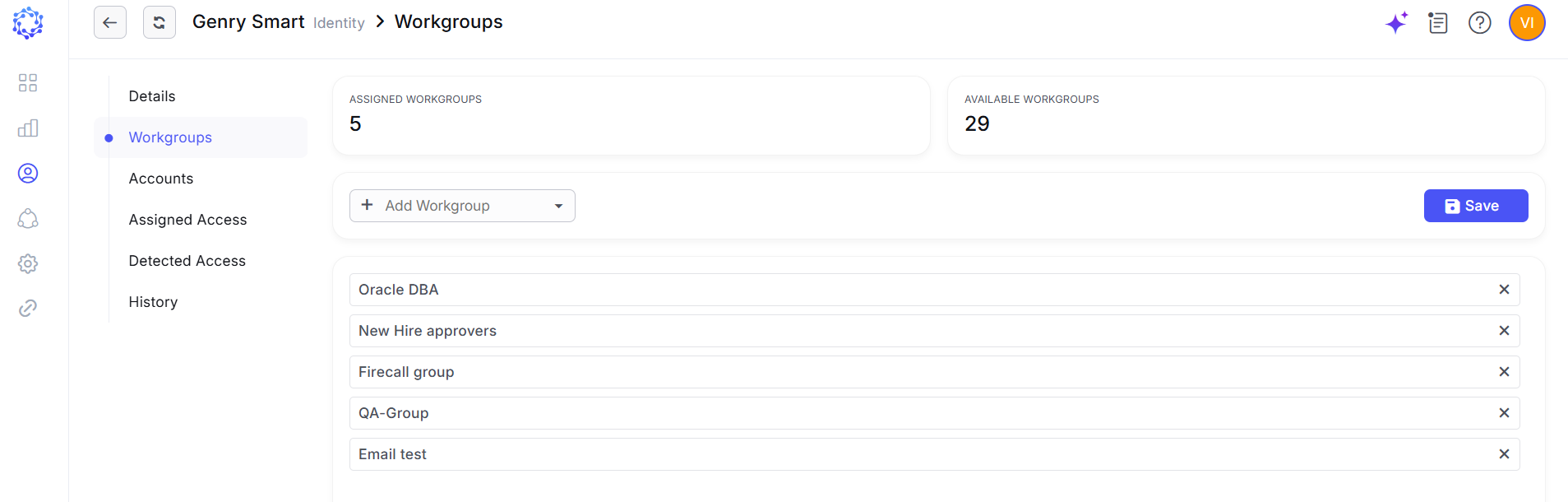 Workgroup page
Usage Period Controls for Privileged Account Access
Enhanced coordination has been introduced for requests that manage the same privileged account. Multiple access requests can now contribute independently to the effective access state of a privileged account, including account unlocking, entitlement assignment, entitlement revocation, and account locking.
-
When overlapping requests, for example, a PAM and a TAR, define different usage periods for the same privileged account, the system automatically evaluates the effective access duration and retains the account in its required state until the latest approved usage period expires. Access revocation and account lock actions are then executed by the request associated with the final expiration time, ensuring consistent and proper enforcement of time-bound privileged access.
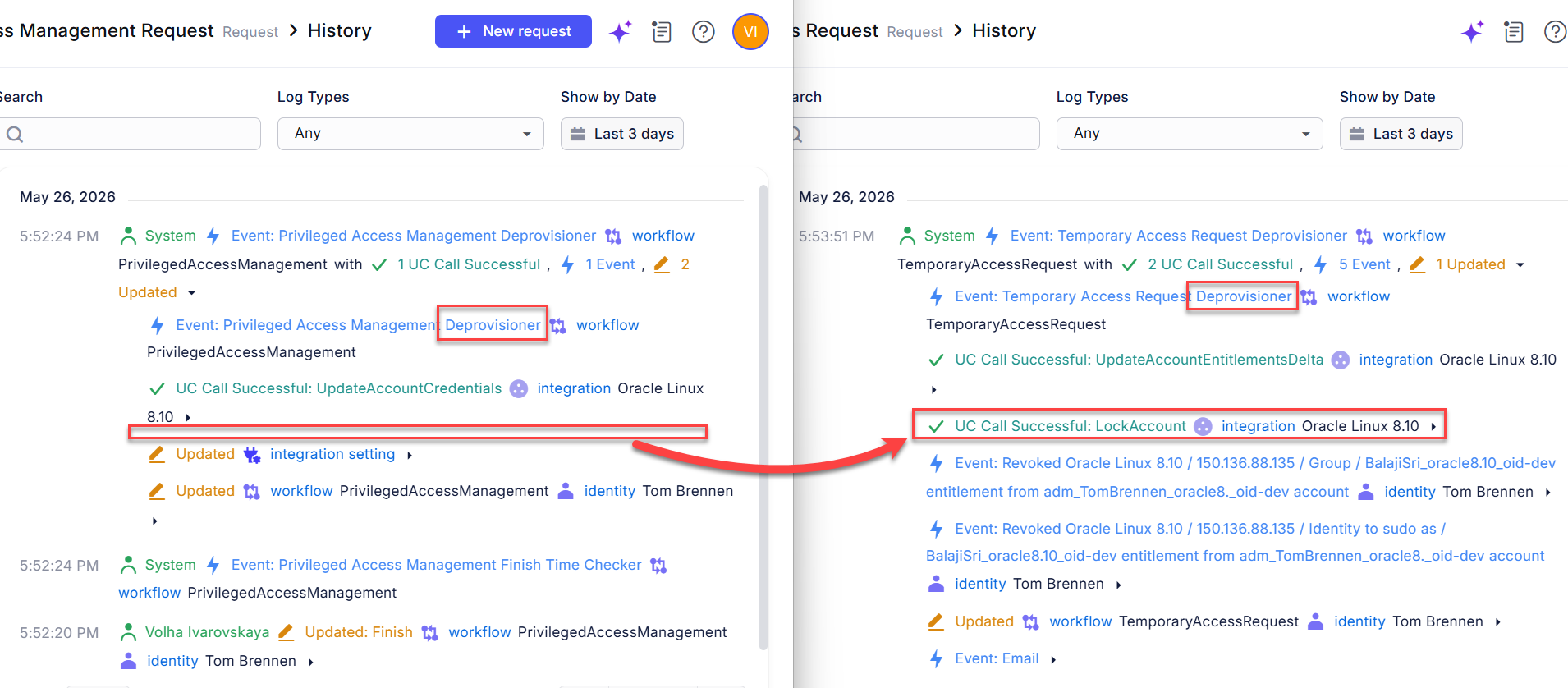 Same privileged account managed by two workflows
In Next Days Forecasting and Access Creep Analysis
Analytics has been enhanced with new time-based operators and access governance monitoring capabilities.
-
Users can now create reports based on future timeframes, enabling proactive planning for upcoming events such as identity onboarding, credential expiration, litigation hold expiration, certification deadlines, and other date-driven lifecycle activities. These forecasting capabilities help administrators anticipate workload, assess future impact, and prepare for upcoming governance actions.
-
The Detected Entitlements report helps in access creep analysis by comparing governed access assignments with access detected on target systems. The report highlights discrepancies such as entitlements that exist on an account but were not assigned through ObserveID, as well as entitlements that were assigned through governance processes but are no longer present on the target account. This enables administrators to identify access drift, unauthorized access, provisioning inconsistencies, and other governance violations more effectively.
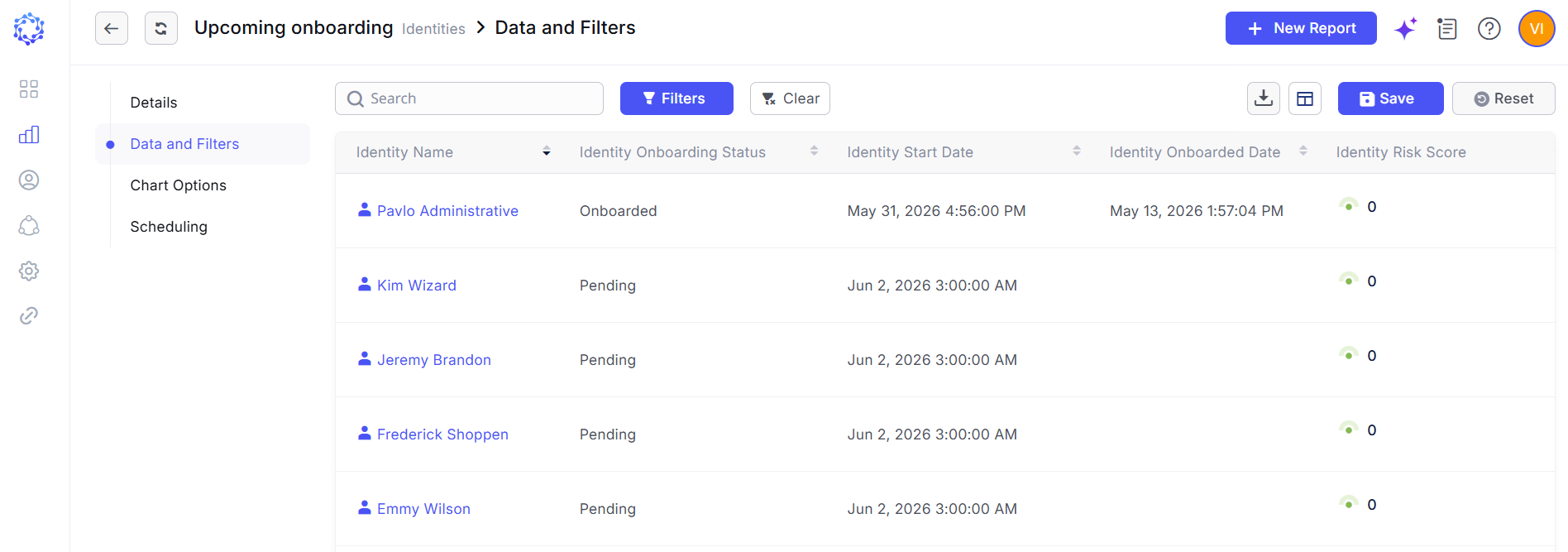 In Next Days operator shows next onboarding
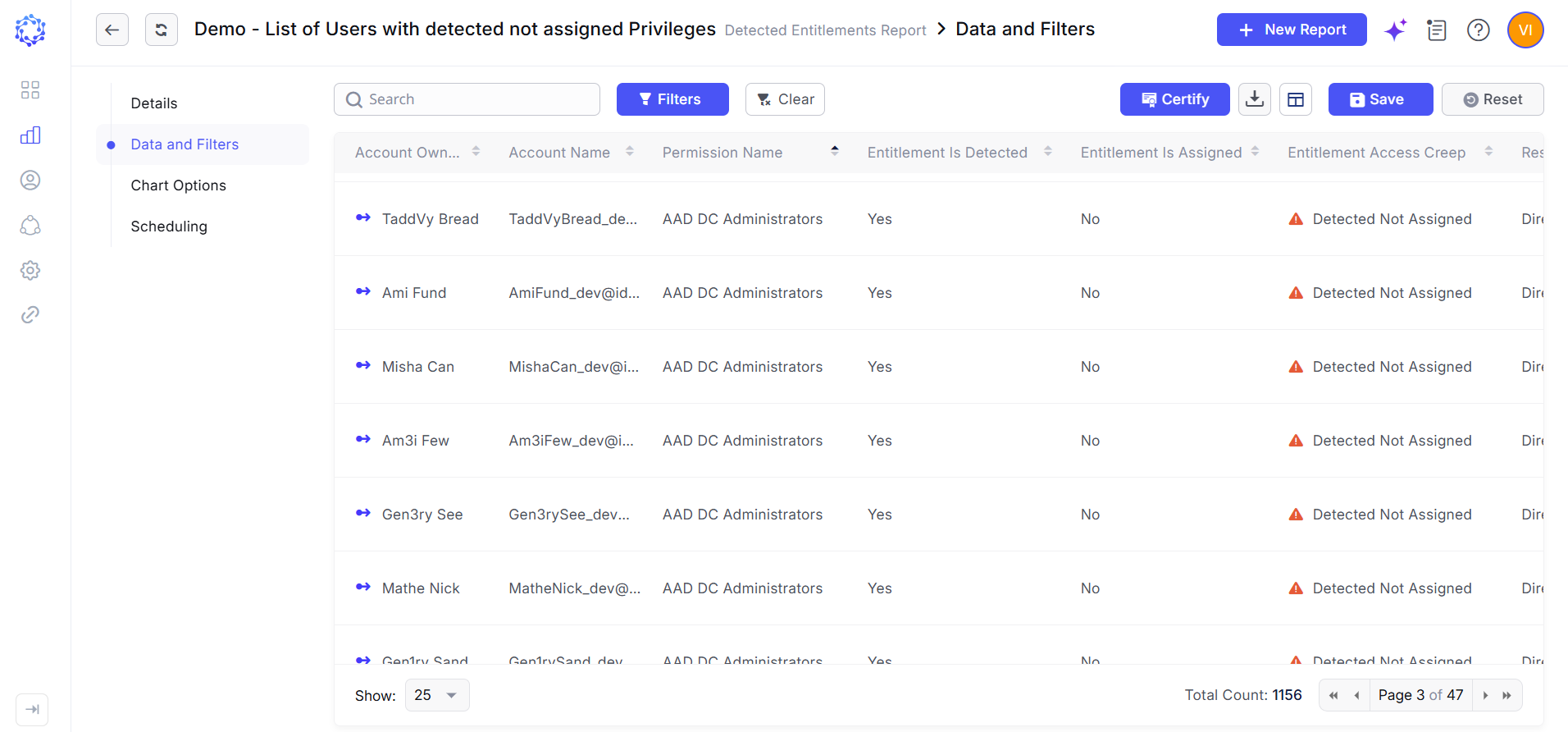 Access creep representation
Permission-Based Access Controls and Audit Logging for AI Capabilities
Obi AI Assistant now operates under a permission-based access model, ensuring that AI-assisted capabilities are available only to identities explicitly authorized to use them. This includes activities such as creating Analytics reports, generating integration rules, and assisting with access analysis during certification campaigns.
- When acting on behalf of a user, Obi operates within the security context of the logged-in identity and inherits only the permissions assigned to that identity. Obi cannot access data, perform actions, or initiate operations beyond the user's authorized scope, ensuring alignment with established access control policies and the principle of least privilege.
- To support governance and audit requirements, all activities performed by Obi on behalf of a user are fully logged and attributed to the initiating identity. These records are retained alongside user-initiated activities, providing a complete audit trail for AI-assisted operations and maintaining accountability across the platform.
Automatic Check-In and Enhanced Credential Activity History
The Credentials Check-Out/Check-In capability has been enhanced with support for automatic credential check-in and expanded audit logging for credential usage activities.
- Administrators can now configure automatic check-in policies to return checked-out credentials without requiring manual user action. This enhancement simplifies credential lifecycle management, and reduces the risk of credentials remaining checked out longer than intended.
- In addition, credential activity history has been expanded to capture richer contextual information for check-out and check-in events. Administrators can configure integration-specific attributes—such as target system instance name, IP address, and other identifying properties—to be recorded alongside credential usage records. This additional context improves traceability, and provides greater visibility into account activity across managed systems.
Affected Components & Modules
- Identities
- Integrations
- Requests
- AI
- User Access Control
- Analytics
- Credentials
- Logging
Note:
The release will be deployed during non-business hours to minimize disruption. Downtime is expected to be less than five minutes, and users are unlikely to experience any noticeable interruption.
References & Support
For detailed instructions or additional technical assistance, please contact your ObserveID support representative at [email protected].
Thank you for choosing ObserveID!