
Application Build 3.8 and UC 3.3.4
August 2026
Overview / Summary
Release 3.8 strengthens identity and access governance through improvements across analytics, risk visibility, auditability, AI-assisted workflows, and privileged remote access. New capabilities simplify local role and permission administration, introduce cross-integration account classification, and provide greater transparency into identity risk and access governance through enhanced Analytics, aggregated statistics, and expanded audit reporting. Usability and Remote Connect enhancements streamline day-to-day administration and optimize file transfer workflows, while Obi provides more intuitive AI-assisted interactions. The release also extends governance visibility into Microsoft Foundry workloads by correlating AI agent token consumption with governed identity and access activity, helping organizations better understand and oversee the use of AI resources.
Key feature enhancements include:
- Local Role Cloning: Faster role creation through reusable configurations
- Local Permissions: Simplified integration access scoping by Integration Type
- Obi: Contextual response suggestions for guided AI interactions
- Account Tags: Cross-integration account classification and analysis
- Risk Analysis: Entitlement-level breakdown of identity risk contributions
- Statistics: Aggregated metrics and Dashboard visualization beyond record-level reporting
- UX/UI Enhancements: Improved filter visibility and Assigned Access summary data
- Analytics Grouping: Dimension-based analysis of access governance risks
- Audit Evidence: Expanded reporting for Certification, PAM & JIT, Onboarding, and Offboarding
- RDP File Transfer: Improved transfers from the Virtual Drive to remote Windows hosts
- Remote Sessions: Desktop and Transfer modes for interactive use and optimized file transfers
- Microsoft Foundry: Identity-attributed agent token usage visibility
New Features & Enhancements
Local Role Cloning
-
Local Role Management now supports role cloning, allowing administrators to create new local roles by using an existing role as a configuration baseline. The cloned role retains the source role configuration and can then be modified to meet different access requirements.
-
Role cloning is particularly useful when roles share the same functional permissions but require different integration access scopes. Administrators can reuse the existing permission configuration and adjust only the integrations and associated data accessible to the new role, simplifying role administration and reducing repetitive configuration.
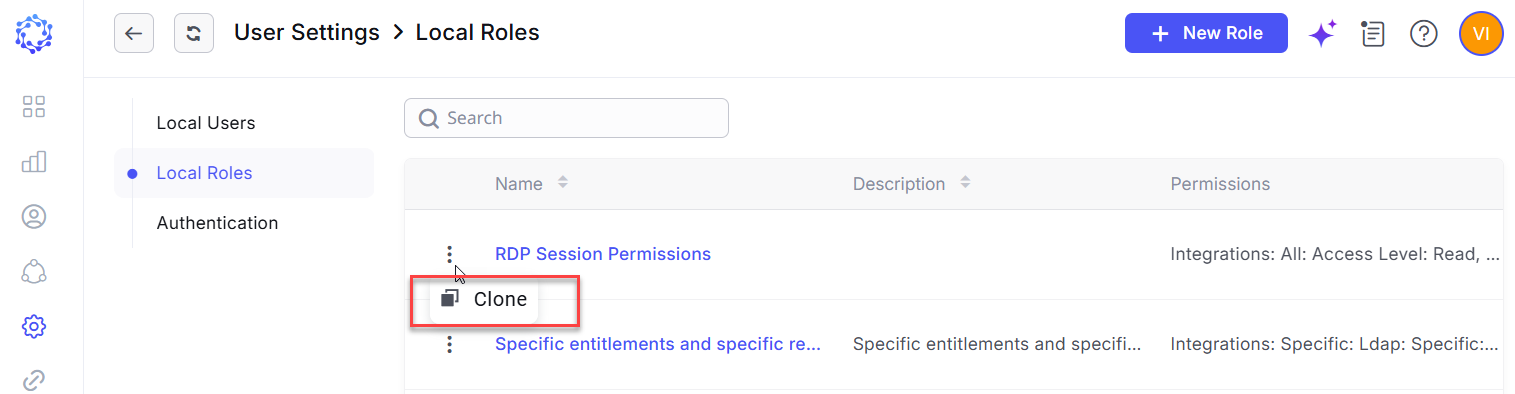 Cloning Local Roles
Local Permission Selection by Integration Type
-
Local Integration Permissions have been reorganized into a hierarchical structure, making it easier to define the integration access scope for local roles. Instead of presenting a flat list of individual integrations, permissions are now grouped by Integration Type, with specific integration instances available beneath each type.
-
Administrators can grant the required level of access across all integrations of a selected type or expand the Integration Type to select individual integrations. This hierarchical approach simplifies permission configuration, particularly in environments with large numbers of integrations, while preserving granular control over integration-specific access.
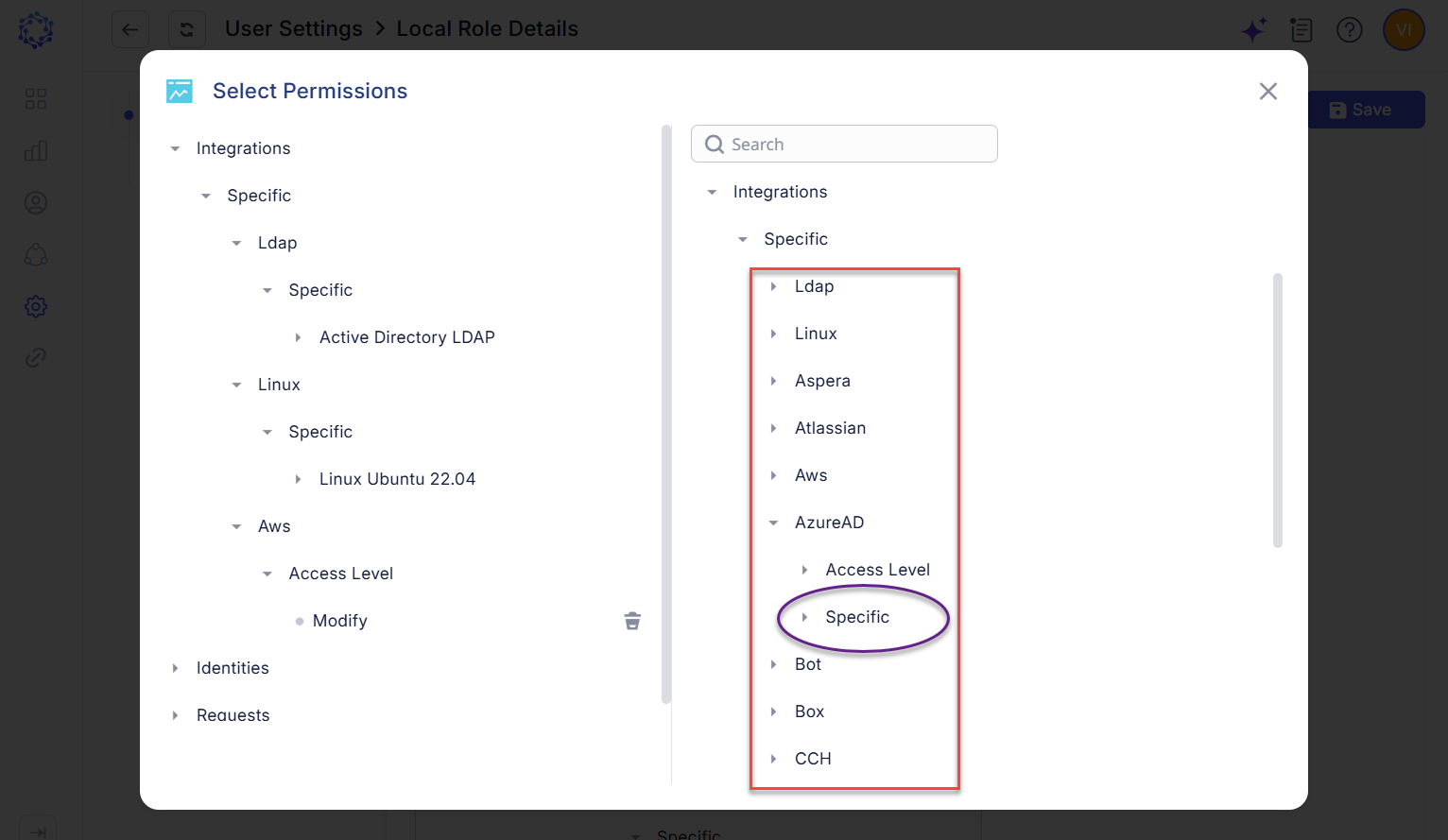 Local Permission Selection by Integration Type
Suggested Response Options in Obi
-
Obi now provides contextual response options that users can select directly during a conversation, reducing the need to manually enter responses or retype information presented by the AI assistant. Suggested options are generated based on the current conversation context, enabling faster and more intuitive interaction while helping users progress through AI-assisted workflows.
-
This capability is initially available for general conversations with Obi and will be progressively extended to specialized AI-assisted scenarios, including Analytics report generation and integration rule development.
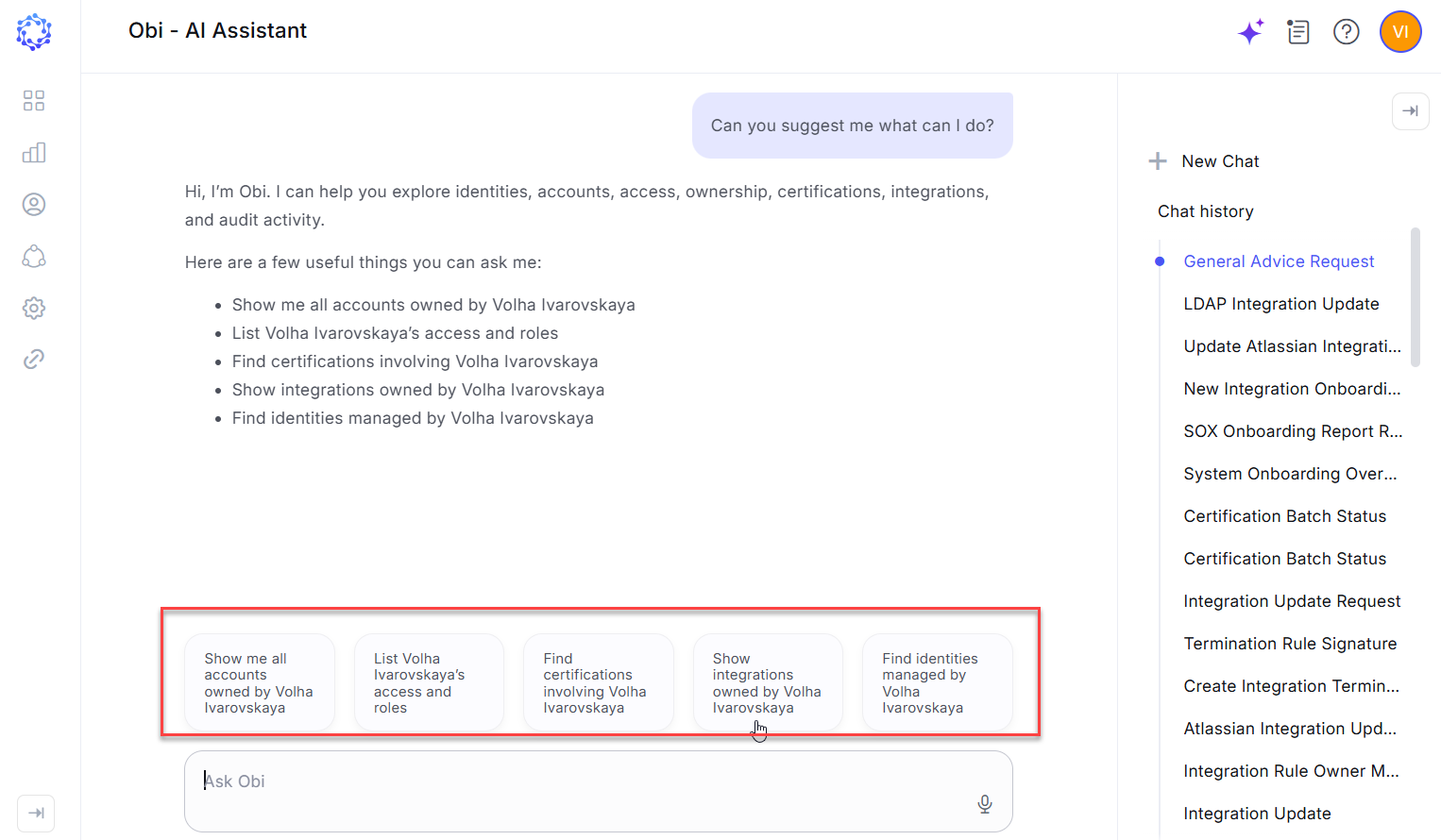 Obi’s suggested responses
Tags for Account Classification and Analysis
-
Accounts can now be assigned tags, providing an additional classification layer for organizing and analyzing account data across integrations. Tags can be applied independently of the account’s source integration, enabling accounts from different connected systems to be grouped into common logical categories.
-
Tagged accounts can be consolidated in Analytics reports and analyzed using account attributes such as ownership, status, last login, and other available properties. Accounts can also have multiple tags, supporting multidimensional classification and enabling administrators to evaluate the same account population from different governance and operational perspectives.
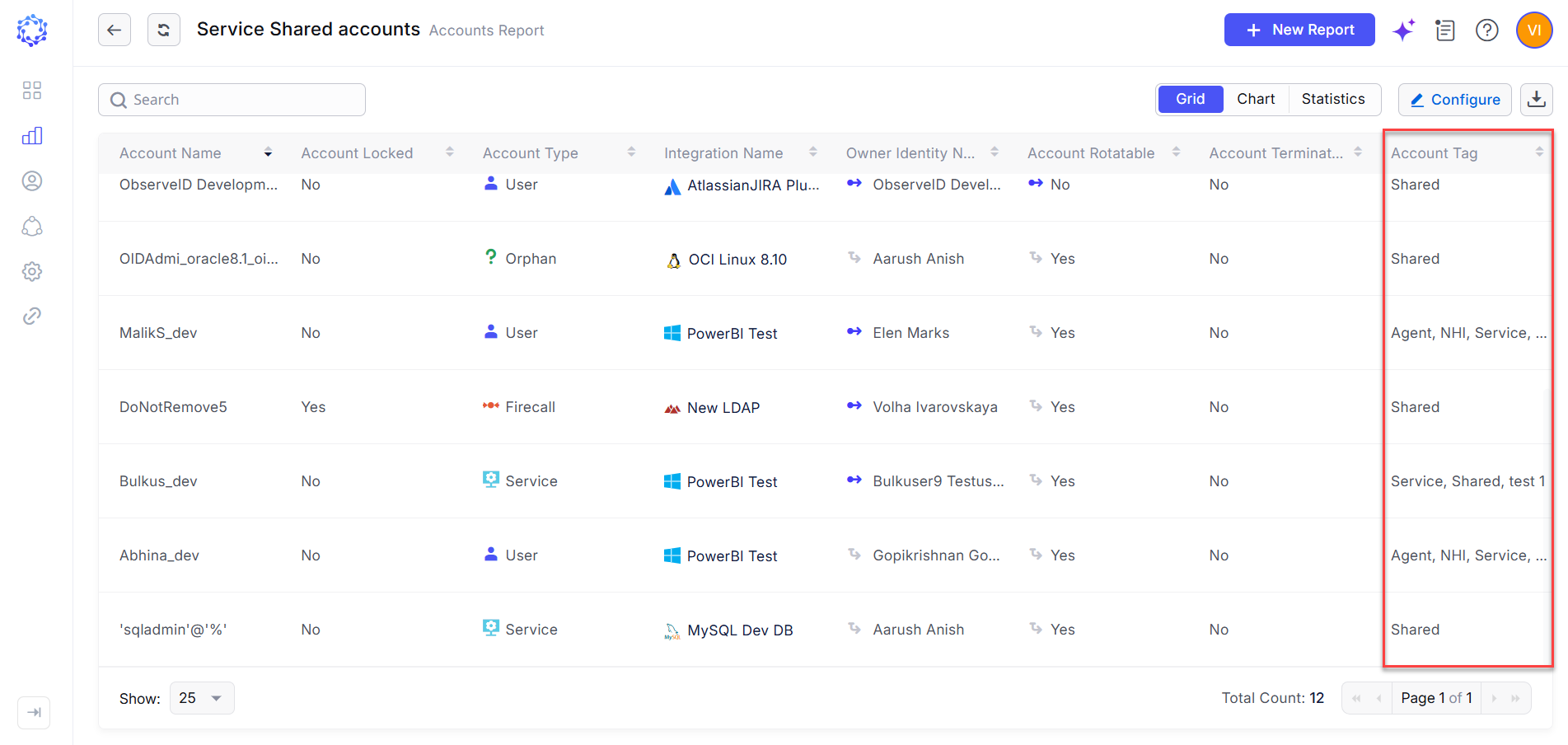 Cross-integration account analysis
Risk Score Breakdown by Violation
Identity-level risk analysis has been enhanced with visibility into the entitlements contributing to an identity’s violation-based risk score. From the Identities area, administrators can review the specific entitlements associated with detected violations, providing a more granular and explainable view of how the overall risk score is derived.
-
The identity-specific view is based on the corresponding Violation report and preserves its configured column structure while limiting the dataset to entitlements associated with the selected identity. For each violation, the resulting risk contribution is calculated as follows: risk contribution = configured weight × number of matching entitlements.
-
This enhancement improves risk score transparency and enables administrators to trace an identity’s risk exposure back to the specific access assignments contributing to detected violations.
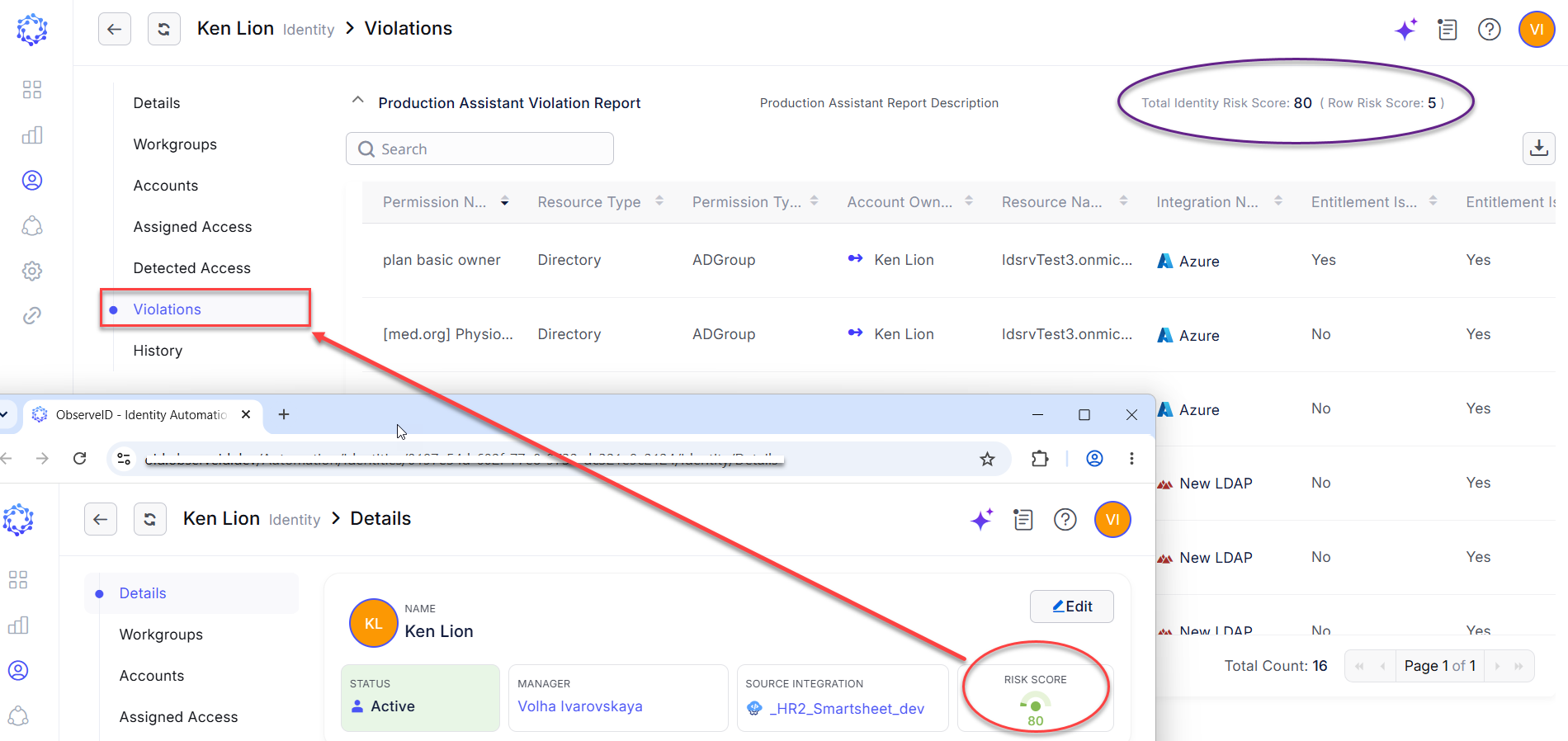 Risk Score Breakdown in Violations
Statistics Report Mode and Dashboard Widget
-
Analytics reports now support a new Statistics mode for generating aggregated summaries from report data. Users can define the source dataset and apply filtering and grouping criteria in the Data and Filters section. The Statistics section then calculates aggregate values for the entire resulting dataset and, when grouping is configured, for each defined group.
-
The resulting statistics can also be displayed as Dashboard widgets, allowing key aggregated values to be surfaced as business metrics for at-a-glance monitoring and analysis. This enhancement extends Analytics beyond record-level reporting by providing summarized, metric-driven views of report data.
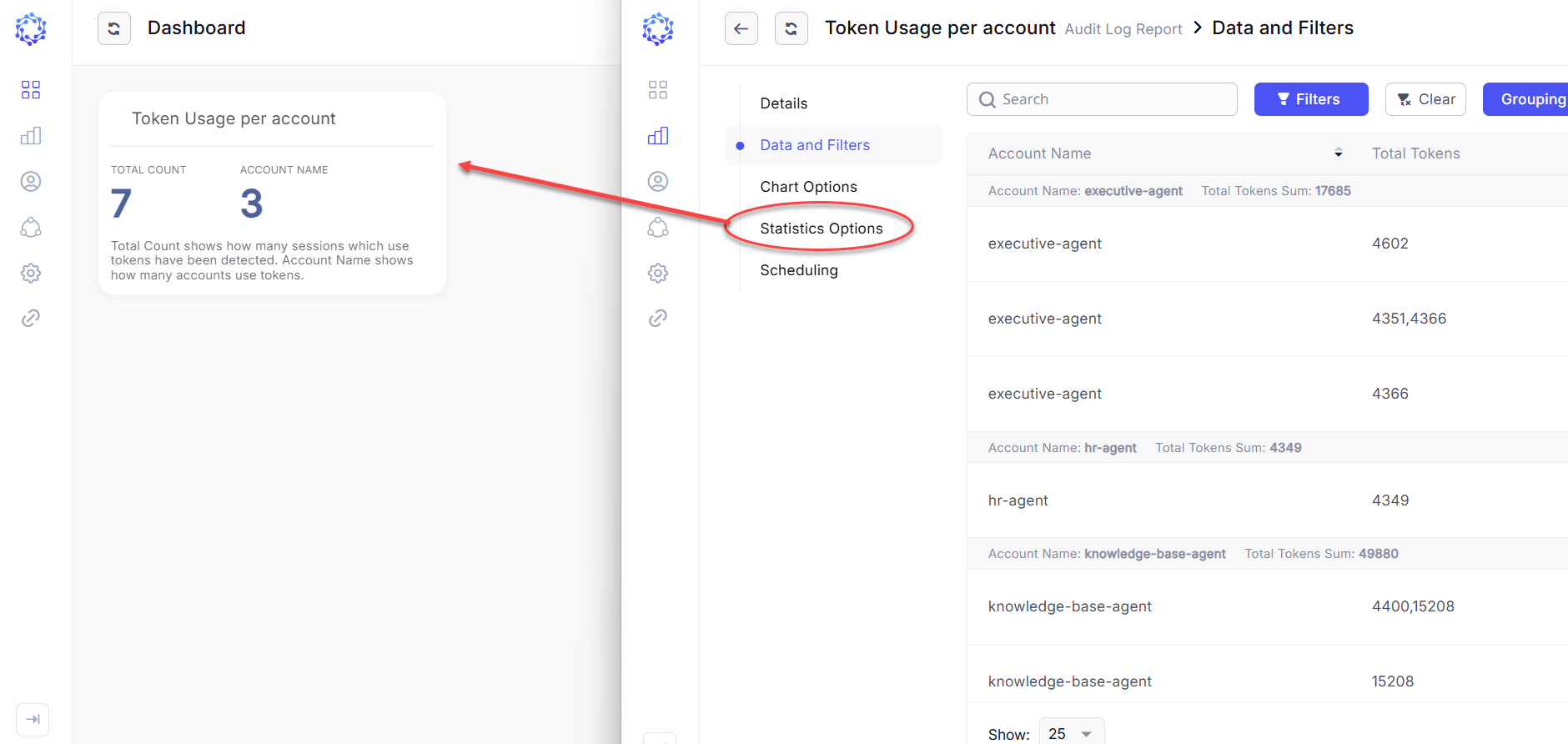 Dashboard widget and report mode
UX / UI Enhancements
This release introduces several user experience and interface improvements designed to simplify navigation, improve data visibility, and make key information easier to interpret across the platform.
-
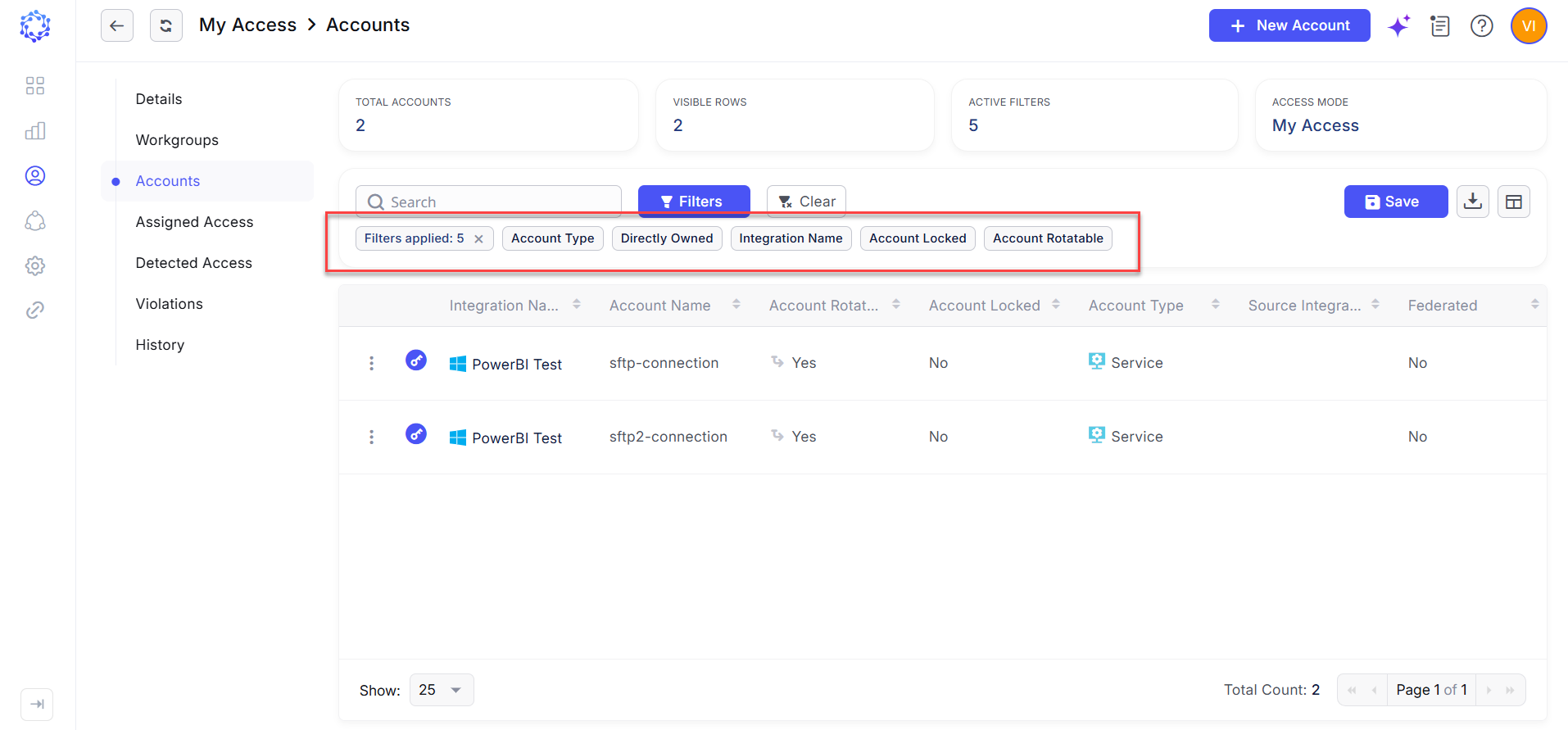
Filter Visualization for Identity Accounts – Active filters applied to an identity’s Accounts grid are now displayed as individual filter tiles. This provides immediate visibility into which filtering criteria are currently applied and makes the resulting dataset easier to understand and refine.
-
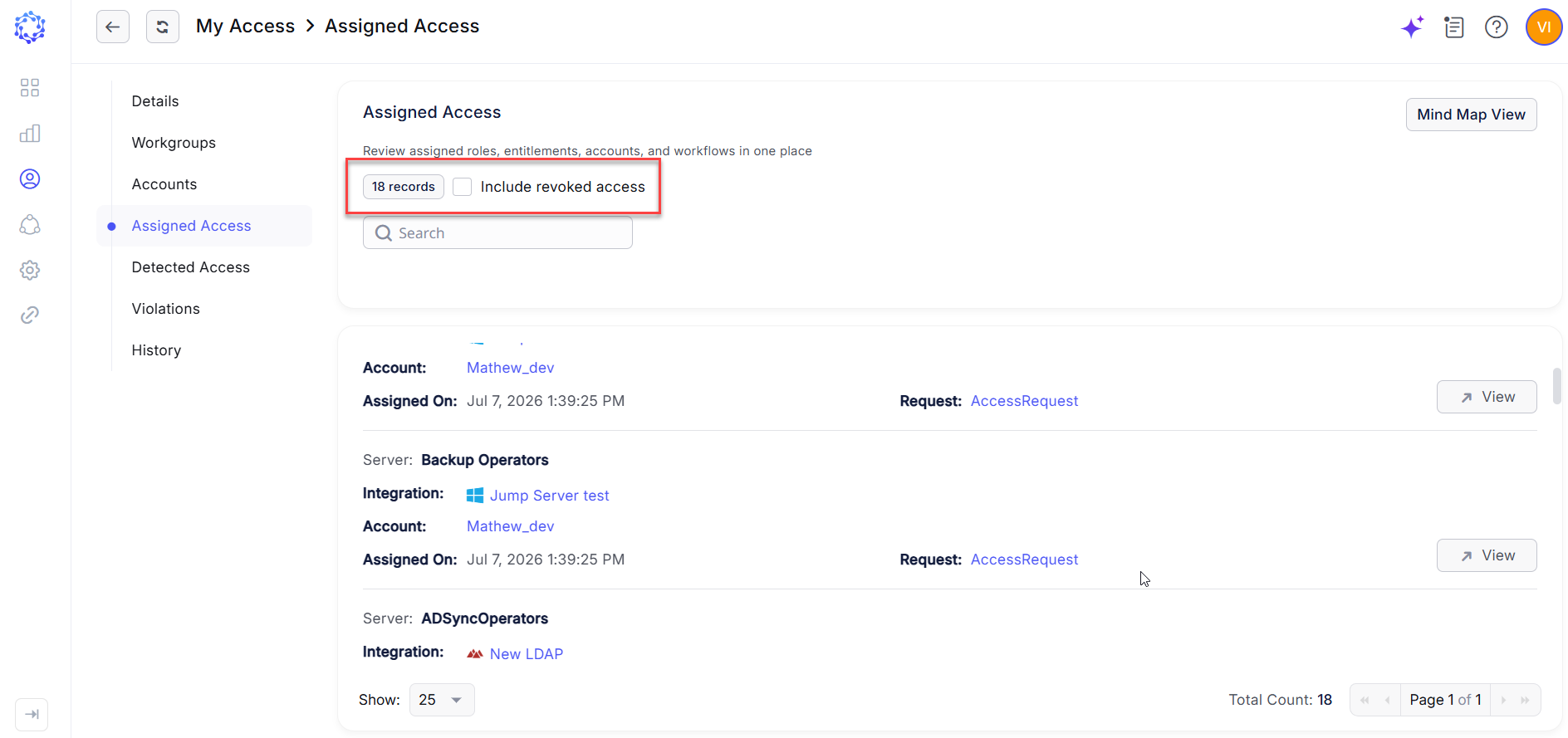
Current and Historical Data in Assigned Access – The Assigned Access view now displays a total count of access assignments explicitly granted through ObserveID. A new checkbox allows users to include historical assignments in the dataset, providing visibility into previously assigned access for audit, investigation, and reference purposes.
Grouping Records in Analytics
-
Analytics now supports grouping report records by a selected dimension, allowing data to be categorized and analyzed based on a shared attribute. Records with the same dimension value are organized into a common group, providing additional context for identifying patterns, concentrations, and relationships within the report dataset.
-
For example, in a Detected Entitlements report, records can be grouped by account to consolidate detected entitlement assignments associated with the same account. When the report is configured to identify potentially conflicting or high-risk entitlements, account-level grouping makes it easier to identify accounts where multiple relevant entitlements occur together. This provides additional analytical support for investigating Segregation of Duties (SoD) conflicts, excessive access, and other access governance risks.
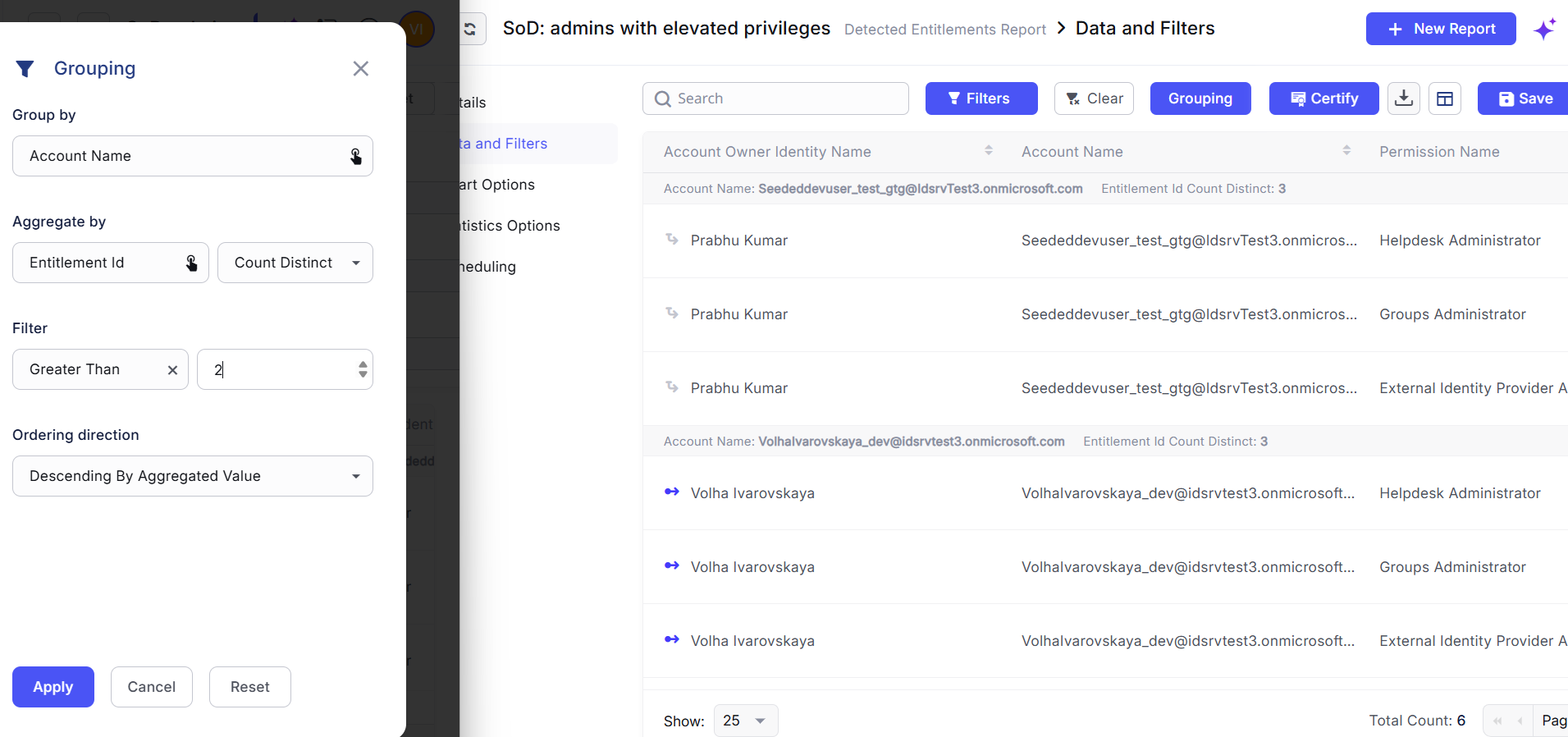 Grouping records in Analytics
Expanded Audit Evidence for Certification, PAM & JIT, Onboarding, and Offboarding
- The Requests report type has been expanded with additional attributes and workflow execution data, providing greater visibility into identity governance and access lifecycle processes. The enriched dataset captures contextual information related to provisioning, deprovisioning, access certification, and privileged or just-in-time access activities, helping administrators prepare evidence for security reviews and compliance audits.
- Available reporting data now includes information such as business justification, identity risk score, HR source, request properties, and governed objects associated with the request, including accounts, entitlements, and roles. By correlating request context with the resulting access operations, administrators can more effectively trace who requested or approved access, what access was affected, why the action was initiated, and how it was processed.
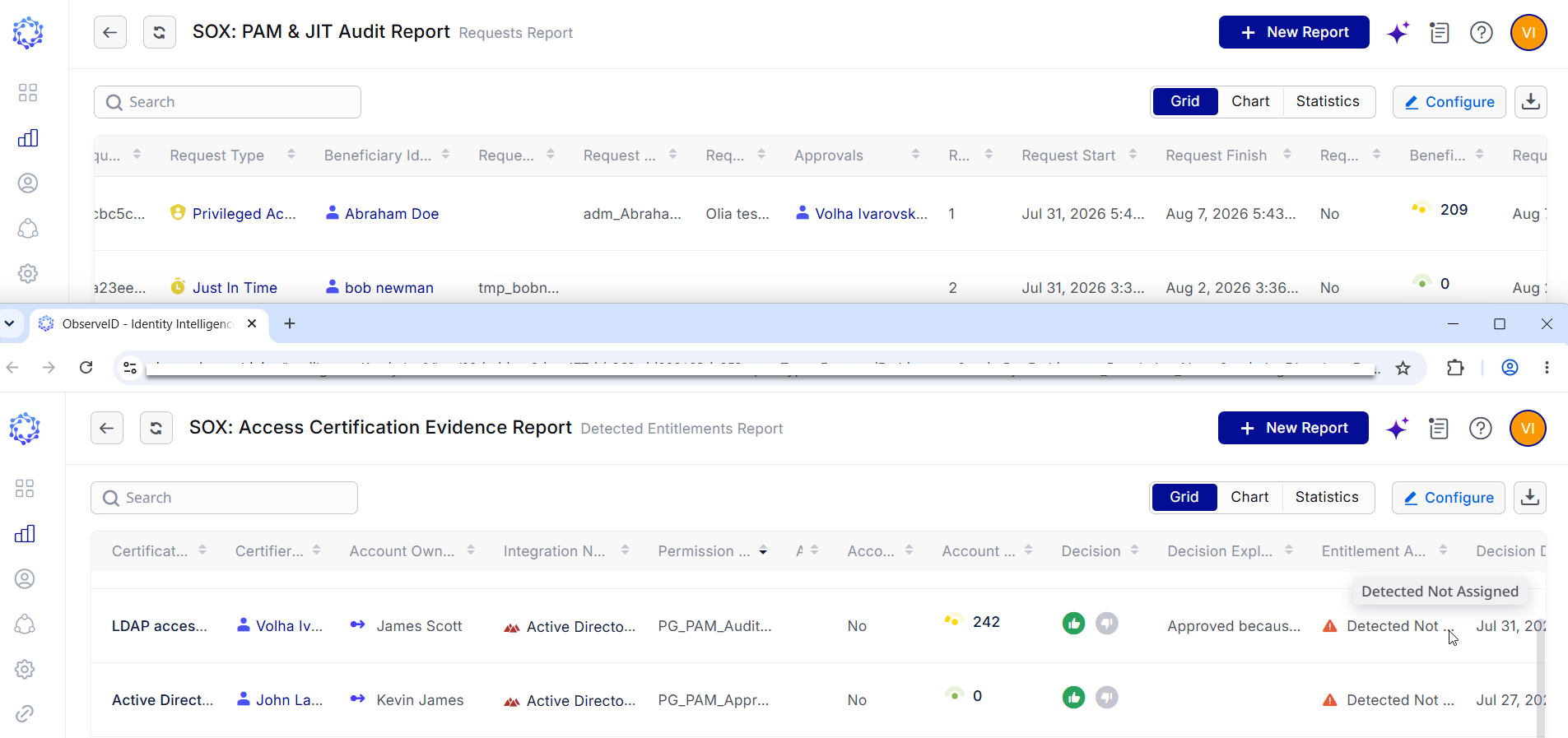 PAM & JIT and Certification reports
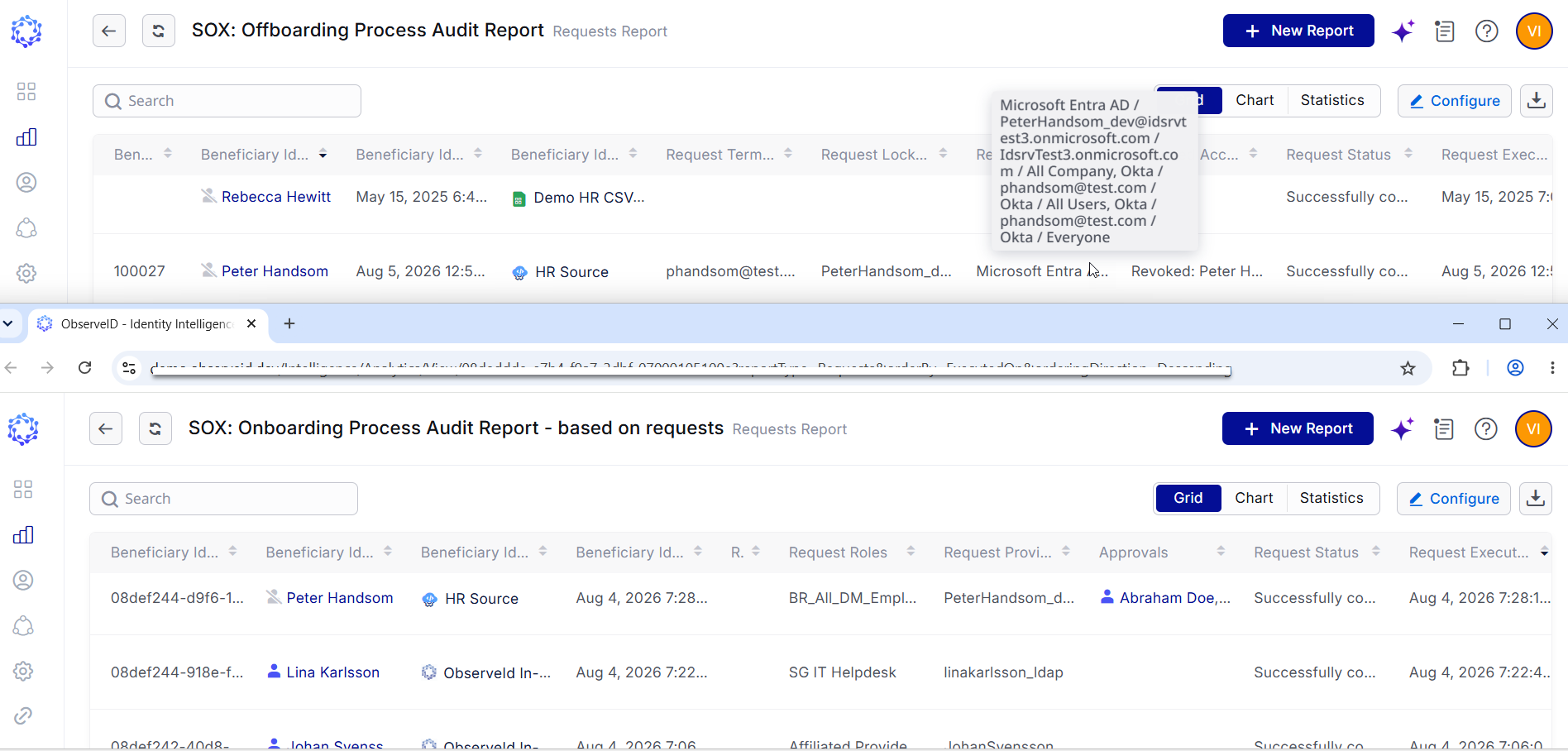 Onboarding and Offboarding reports
Improved File Transfer from Virtual Drive to Remote Windows Hosts
-
File transfer during RDP sessions has been enhanced to improve copying files from the Guacamole Virtual Drive to the connected Windows host. Users can now transfer files from the virtual drive to locations on the remote system, such as the Windows desktop, with improved responsiveness during the operation.
-
Remote Desktop input and display processing has also been optimized while file transfers are in progress. File-transfer traffic is handled with lower priority relative to interactive session activity, allowing display updates and user input to remain responsive during transfer operations. These improvements provide a smoother Remote Connect experience while maintaining controlled file transfer within RDP sessions.
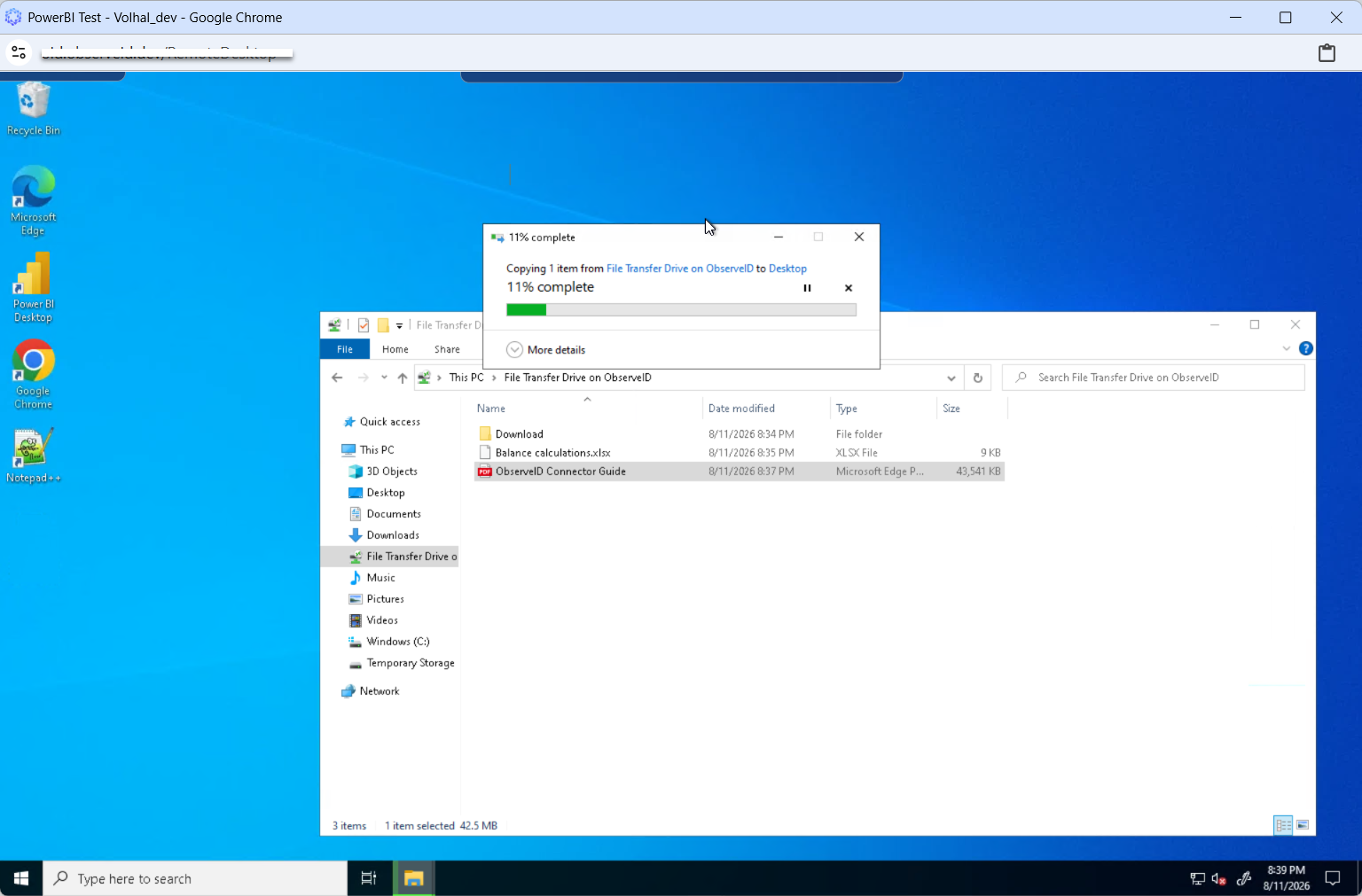 Copying a file from a virtual drive to a remote Windows host
Remote Session: Desktop and Transfer Modes
-
Remote Connect sessions over RDP and SSH now support two modes: Desktop and Transfer. Desktop mode is designed for interactive remote access, enabling keyboard, mouse, and file transfer operations simultaneously. Because the communication channel is shared across all session activities, file transfer throughput may be lower during active user interaction.
-
Transfer mode prioritizes file transfer performance by temporarily suspending interactive user input. By dedicating the communication channel to file transfer operations, the system maximizes available bandwidth and improves transfer speed for large or bulk file uploads and downloads.
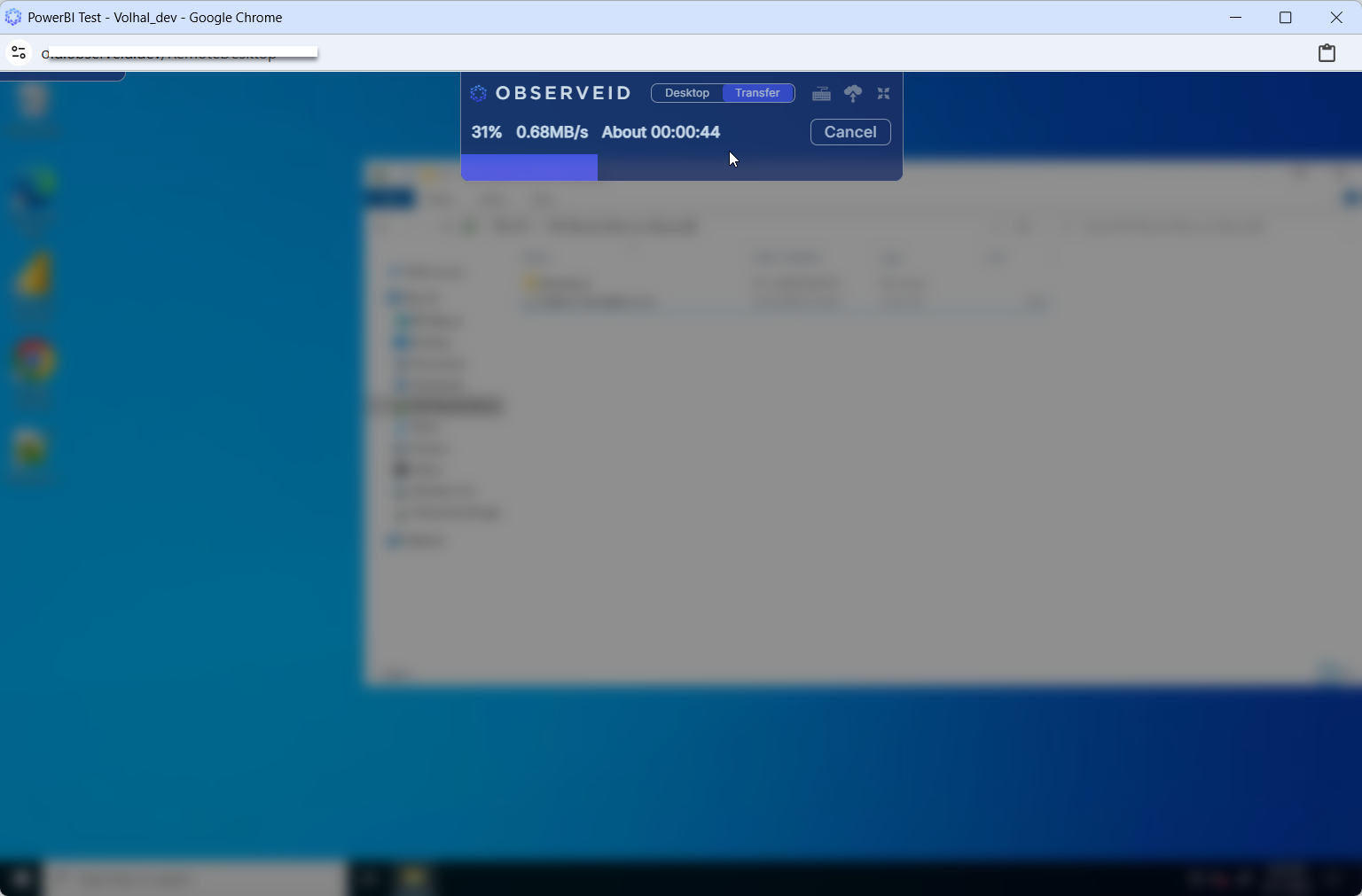 Transfer mode during a remote session
Microsoft Foundry Agent Token Usage in Detected Sessions
Access Detection for Azure has been enhanced with additional Microsoft Foundry agent usage data. When a detected hosted-agent session can be correlated with an account and identity, the Audit Log provides additional AI-specific context alongside the corresponding access record.
-
The enriched dataset includes metrics such as input token count, output token count, and total token usage, along with other available agent activity attributes. This additional telemetry enables administrators to analyze AI resource consumption by account or identity, compare usage patterns, and investigate unusually high or unexpected token consumption.
-
By correlating identity and access information with AI usage telemetry, this enhancement extends access auditing into AI workloads and provides greater visibility into who is using governed AI resources and how intensively they are being used.
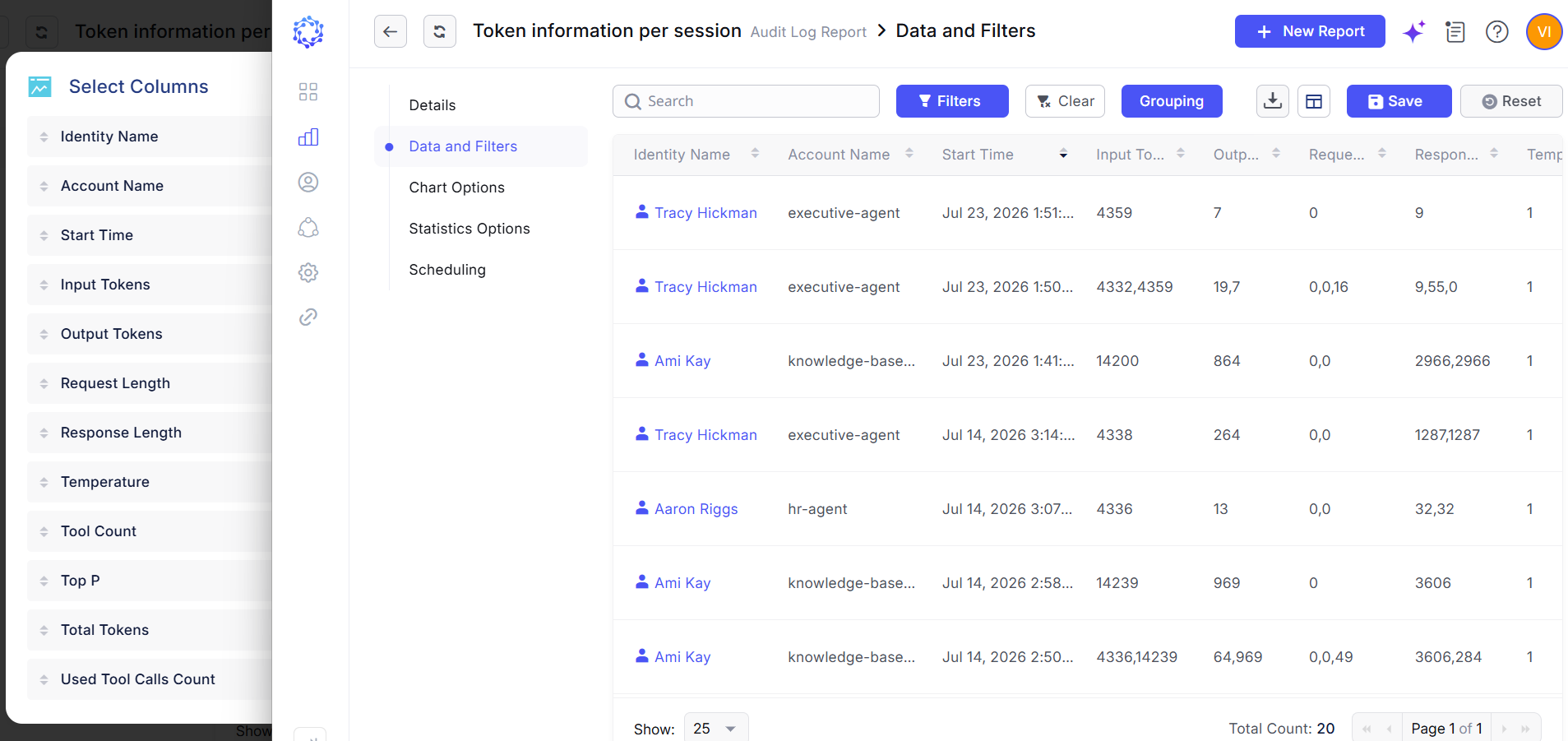 Token information per session
Affected Components & Modules
- Local Roles
- AI
- Tags
- My Access
- Identities
- Violations
- Risk Score
- Analytics
- Filters
- Dashboard
- Remote Connect
- File Transfer
- Azure integration
Note:
The release will be deployed during non-business hours to minimize disruption. Downtime is expected to be less than five minutes, and users are unlikely to experience any noticeable interruption.
References & Support
For detailed instructions or additional technical assistance, please contact your ObserveID support representative at [email protected].
Thank you for choosing ObserveID!