
Application Build 3.9 and UC 3.3.6
September 2026
Overview / Summary
Release 3.9 expands ObserveID capabilities across authentication, access governance, ITSM integration, and user experience. New OIDC and SAML Single Sign-On capabilities extend centralized authentication to target applications and enable seamless browser-based access through Remote Connect. Access governance and operational workflows are strengthened through richer ITSM request tracking and ticket customization, and historical visibility into certification activities and access decisions. New Dashboard widgets, Identity Account Tiles, and streamlined Remote Connect interactions further simplify day-to-day access and governance activities, helping organizations improve security oversight, traceability, and operational efficiency across the platform.
Key feature enhancements include:
- OIDC and SAML Single Sign-On: Centralized authentication for SSO-enabled target applications
- Remote Connect through Single Sign-On: Seamless browser-based access to target applications without separate credential entry
- Expanded MFA Status Visibility: Greater visibility into MFA enrollment, adoption, and enforcement
- Fallback Approval for Permanent Access Requests: Reliable approval routing when the primary approval path cannot be completed
- Enhanced ITSM Request Details and History: improved visibility and traceability of ITSM-based request fulfillment
- Customized ITSM Ticket Descriptions: Workflow-aware templates for creating contextual and actionable ITSM tickets
- Enhanced Password Management: Policy enforcement, expiration awareness, and secure credential reissuance for Local Authentication
- UX/UI Enhancements: NHI terminology alignment and faster Remote Connect access through the new Tiles view
- New Dashboard Widgets: Direct access to frequently used Remote Connect and certification activities
- Certification History: Improved traceability of certification events, access decisions, and changes over time
New Features & Enhancements
ObserveID OIDC and SAML Single Sign-On
This release introduces support for OpenID Connect (OIDC) and SAML-based Single Sign-On (SSO), enabling ObserveID to provide centralized authentication for configured target applications.
- For OIDC, ObserveID acts as the OpenID Provider (OP) and the target application as the OIDC Client (Relying Party). For SAML, ObserveID acts as the Identity Provider (IdP) and the target application as the Service Provider (SP).
- Once the required trust relationship is configured between ObserveID and the target application, authenticated ObserveID users can access supported applications through SSO without being prompted for separate target credentials. This capability extends ObserveID authentication to connected applications and provides a foundation for centralized access to SSO-enabled systems.
Remote Connect through Single Sign-On
Remote Connect now supports browser-based access to SSO-enabled target applications using the user's existing authenticated ObserveID session.
- In addition to RDP and SSH connections, Remote Connect can now provide access to web applications through Web Browser (SSO). The target application and ObserveID must be configured for SSO in advance.
- When an authenticated user selects Connect for an eligible integration in My Access, ObserveID opens the target application in a browser and initiates the configured SSO flow. The target application processes the OIDC authentication response or SAML assertion and establishes its own authenticated application session.
- This enhancement eliminates the need for the user to enter separate target credentials, and provides streamlined access to target systems through centralized authentication with ObserveID.
Expanded MFA Status Visibility
MFA status information is now available across additional areas of ObserveID.
-
When an MFA enforcement grace period applies, the remaining time before MFA becomes mandatory is now explicitly displayed, giving users a clear indication of when MFA enrollment will be required.
-
MFA status information is also available on the Details pages for Identities and Local Users and can be included in Identity reports in Analytics. This enhancement provides administrators with centralized visibility into MFA adoption and enforcement across governed identities and local users.
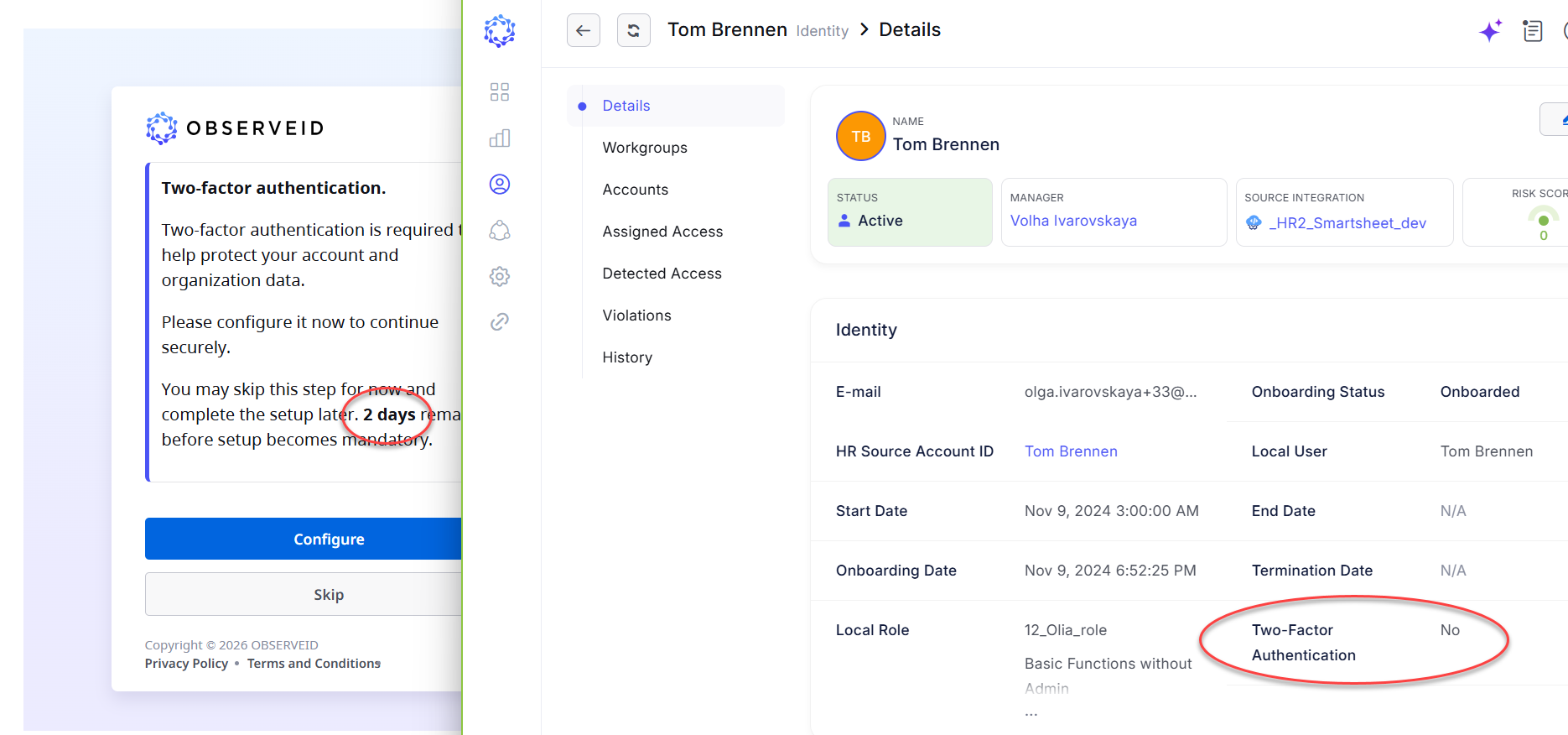 MFA information
Fallback Approval for Permanent Access Requests
Approval routing for Permanent Access Requests (PARs) has been enhanced to prevent required approvals from being bypassed when a designated manager approver is unavailable.
- Previously, if the approval strategy required the beneficiary's manager to approve a request but no manager was assigned, the request was automatically approved. Now, the approval request is automatically routed to the Default Approver, providing a fallback approval path and ensuring that the required approval is completed.
Enhanced ITSM Request Details and History
ITSM requests now provide more detailed information about associated ITSM tickets on the Details and History pages.
-
In addition to listing the tickets created by ObserveID in the ITSM system, the request details now distinguish between pending and completed tickets. As ticket status is continuously checked and updated from the ITSM system to ObserveID, the request details reflect the current progress of the associated tickets, providing greater visibility into ITSM-based request fulfillment.
-
The ITSM request history has also been optimized to record only changes detected since the previous status check rather than the complete ticket dataset. This change-based history makes it easier to track ticket updates over time while reducing redundant information in the request history.
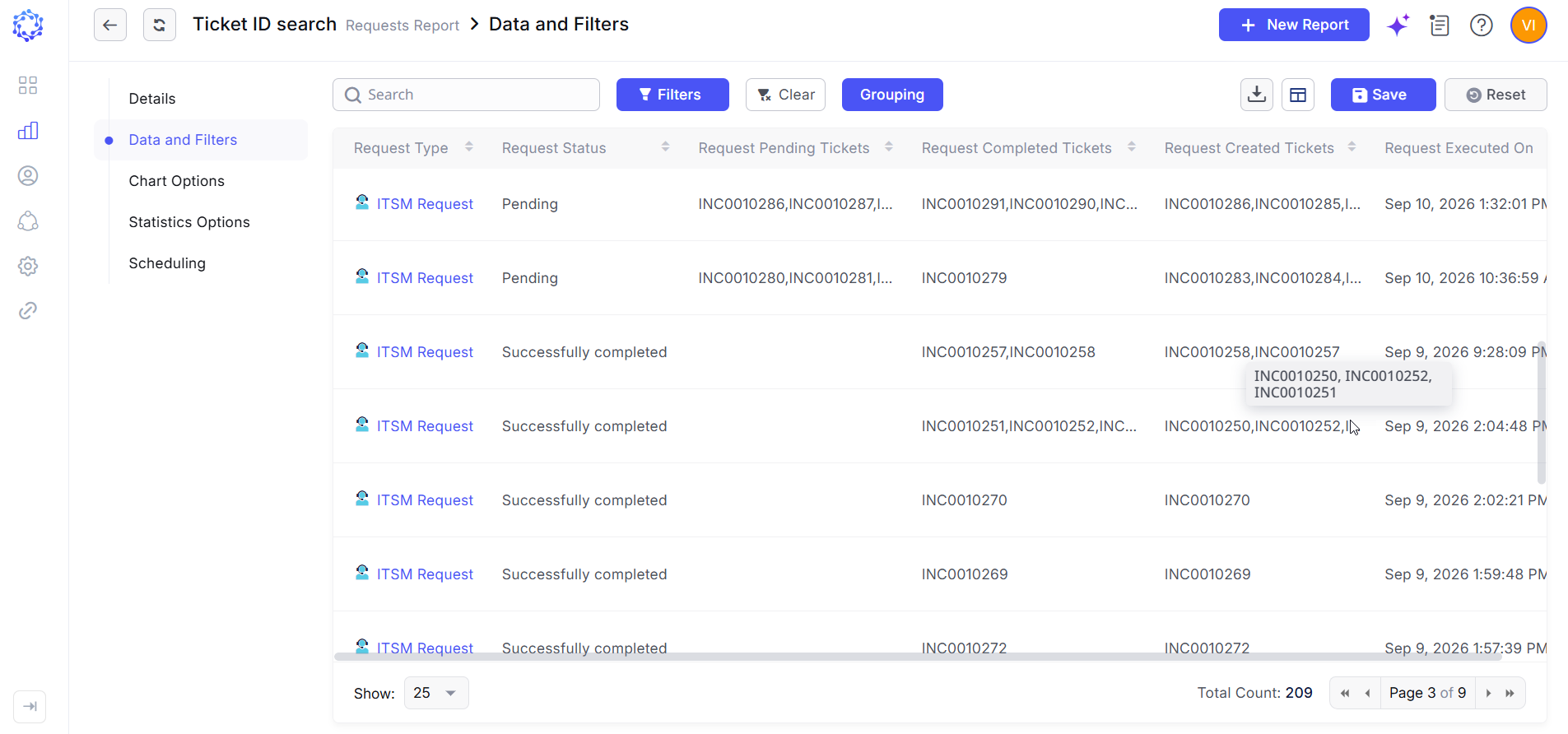 ITSM-based request fulfillment
Customized ITSM Ticket Descriptions
Administrators can now configure description templates for tickets created by ObserveID in connected ITSM systems.
-
Templates can incorporate data from the originating ObserveID workflow, allowing ticket descriptions to include relevant request context, affected objects, and instructions for processing the ticket. This enhancement provides greater flexibility in tailoring ITSM tickets to operational requirements and helps ITSM administrators understand why a ticket was created, what action is required, and the context needed to complete it.
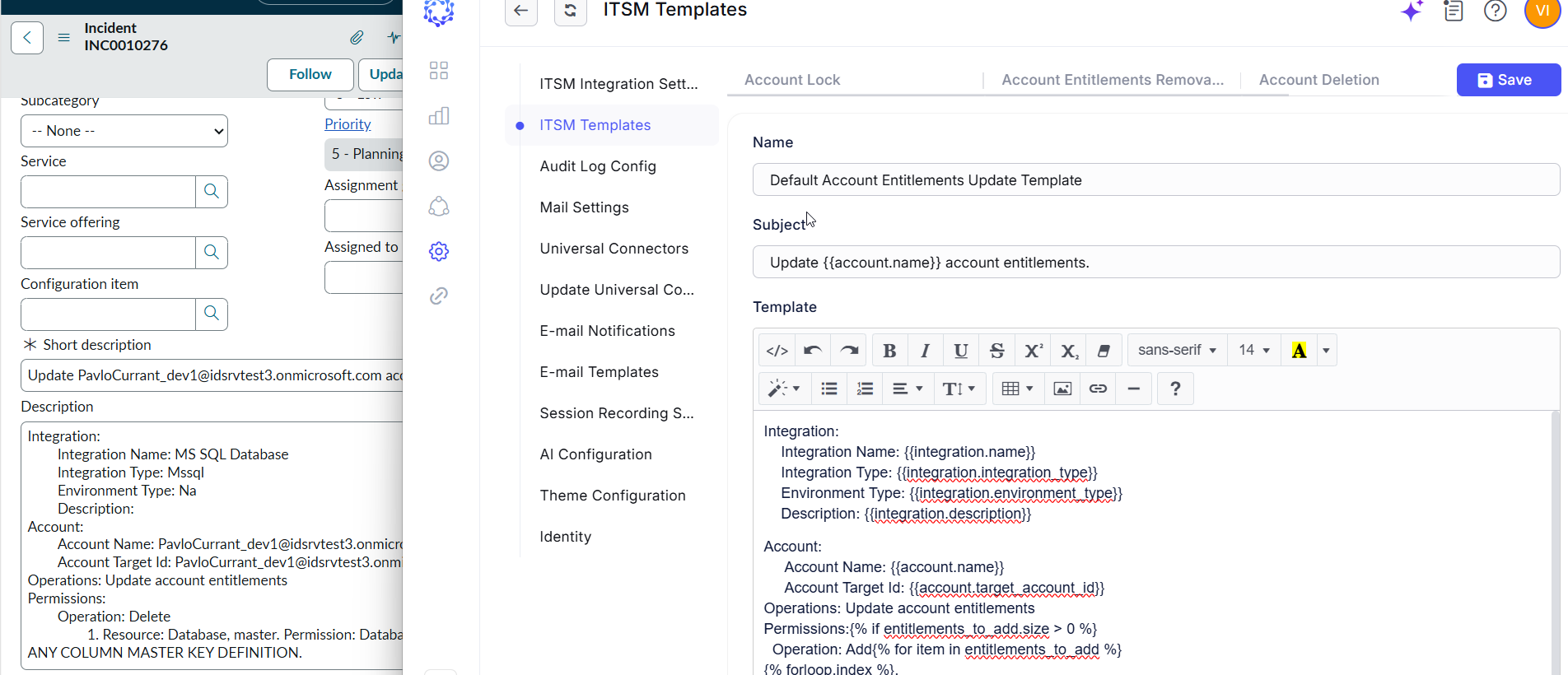 ITSM Ticket Description
Enhanced Password Management
Local Authentication has been enhanced with additional password management capabilities that help organizations enforce credential security requirements throughout the password lifecycle.
-
Password Expiration: Users can now be forced to update the password if a configurable number of days expires, helping reduce authentication disruptions caused by expired passwords.
-
Password Policy: Passwords must comply with the configured password policy, including applicable complexity and other password requirements, helping ensure consistent credential standards for Local Authentication.
-
Invitation and Password Reset: Administrators can resend a user invitation while issuing a new password and require the user to change it at the next sign-in, providing a controlled way to reissue initial access credentials.
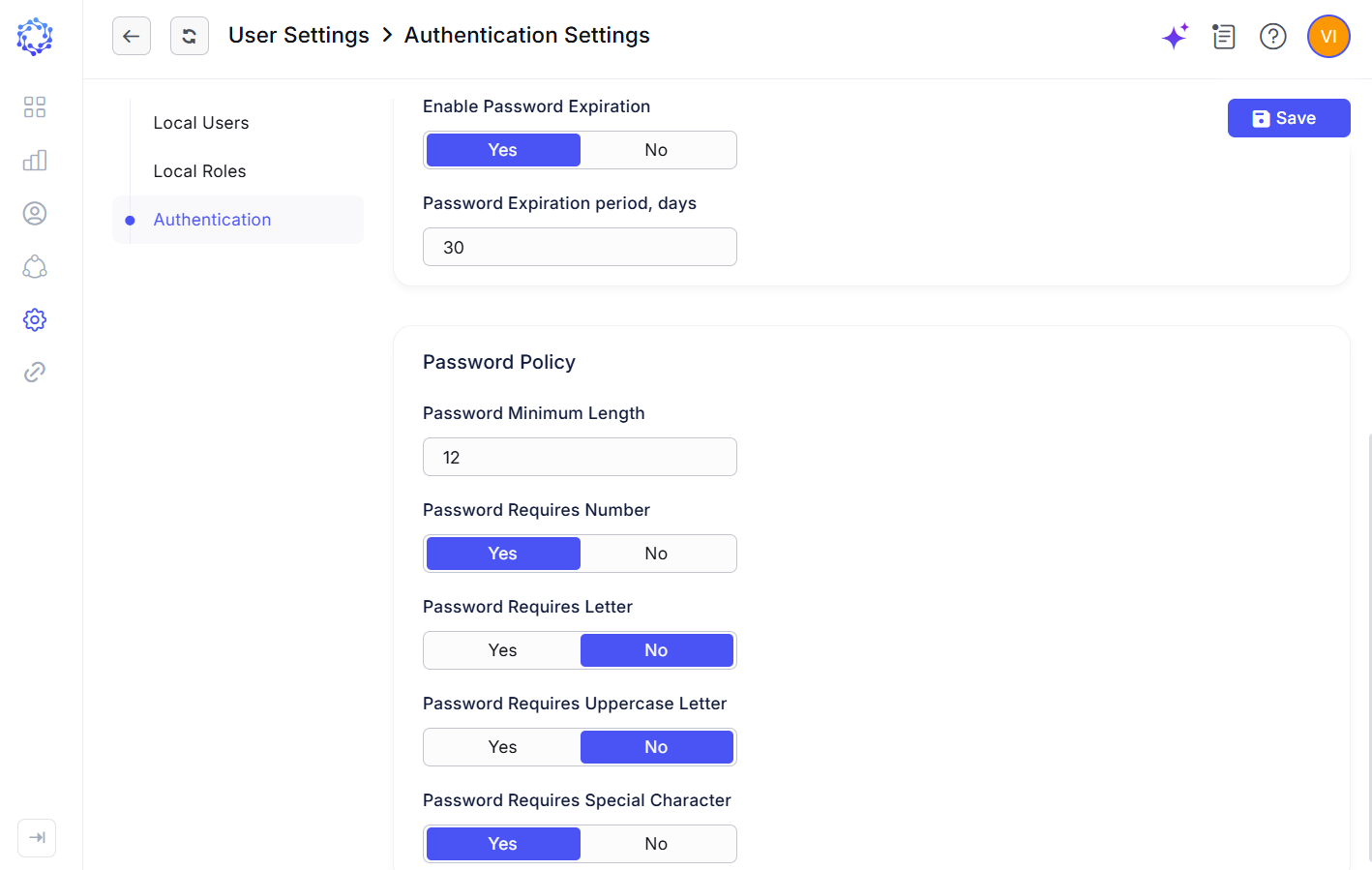 Password Management
UX/UI Enhancements
This release introduces additional user experience and interface improvements for account classification and Identity Account navigation.
-
Non-Human Identity (NHI) Account Type: The account type previously labeled Service Account has been renamed NHI (Non-Human Identity), aligning ObserveID terminology with the broader concept of accounts used by non-human entities rather than individual users.
-
Tiles View for Identity Accounts: Identity Accounts can now be displayed in a new Tiles view, providing a more visual and action-oriented alternative to the standard grid while preserving filtering, search, and credential check-out capabilities. When Remote Connect is configured for the corresponding integration, selecting an account tile can initiate the configured remote connection, providing faster access to managed target systems.
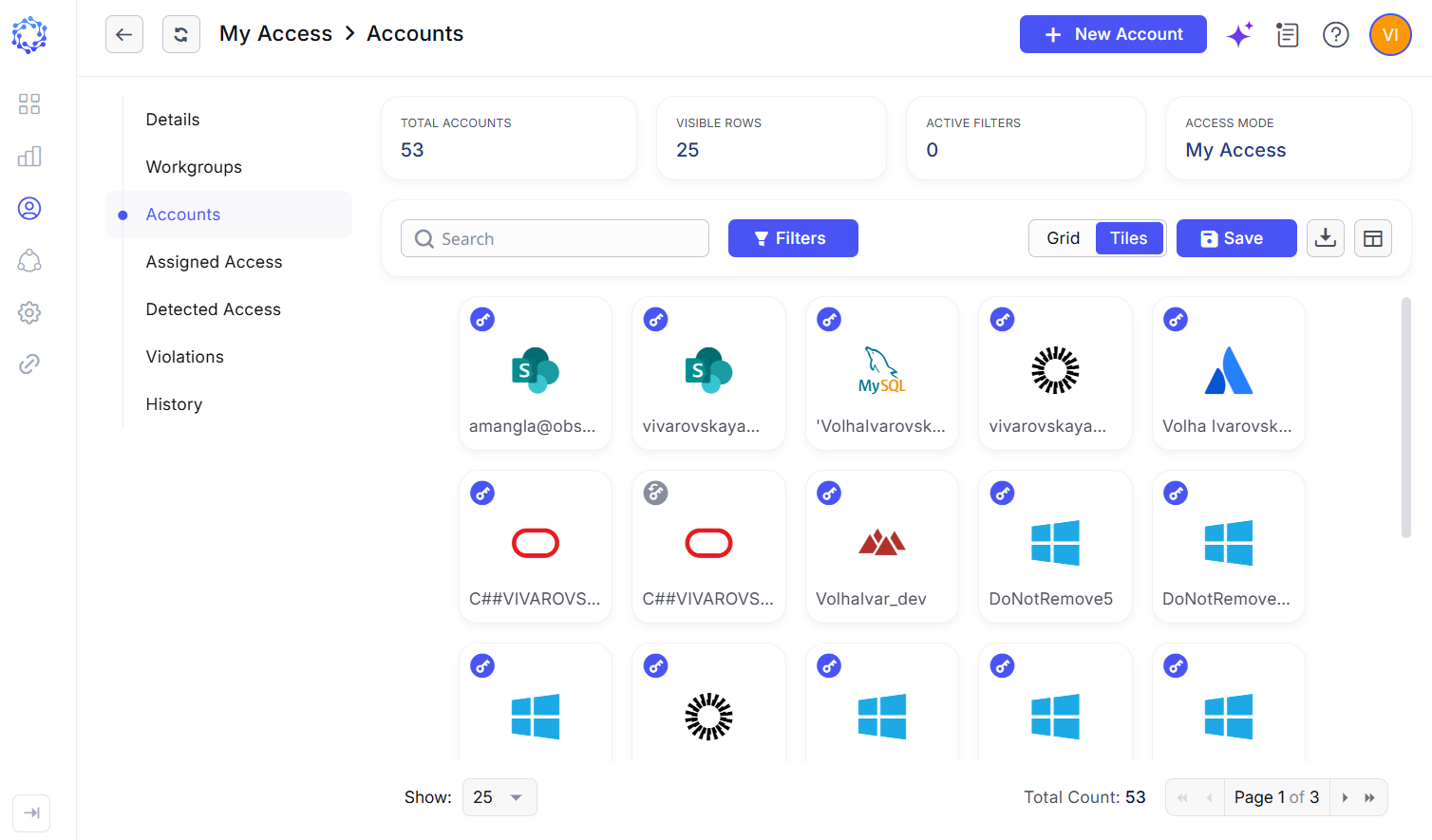 Tiles mode
New Dashboard Widgets
New Dashboard widgets provide faster access to frequently used certification and Remote Connect capabilities, allowing users to initiate key actions directly from the Dashboard.
-
Application widget: The new Application widget brings Remote Connect to the Dashboard, allowing users to initiate a configured remote connection to a target application directly after signing in to ObserveID. This provides faster access to frequently used applications without requiring users to navigate to the corresponding account.
-
Certification widget: The new Certification widget provides a personalized view of certifications relevant to the signed-in identity. It displays certifications for which the identity is the creator, an assigned certifier, or the final sign-off authority, making it easier for users to identify and access certification activities that require their involvement.
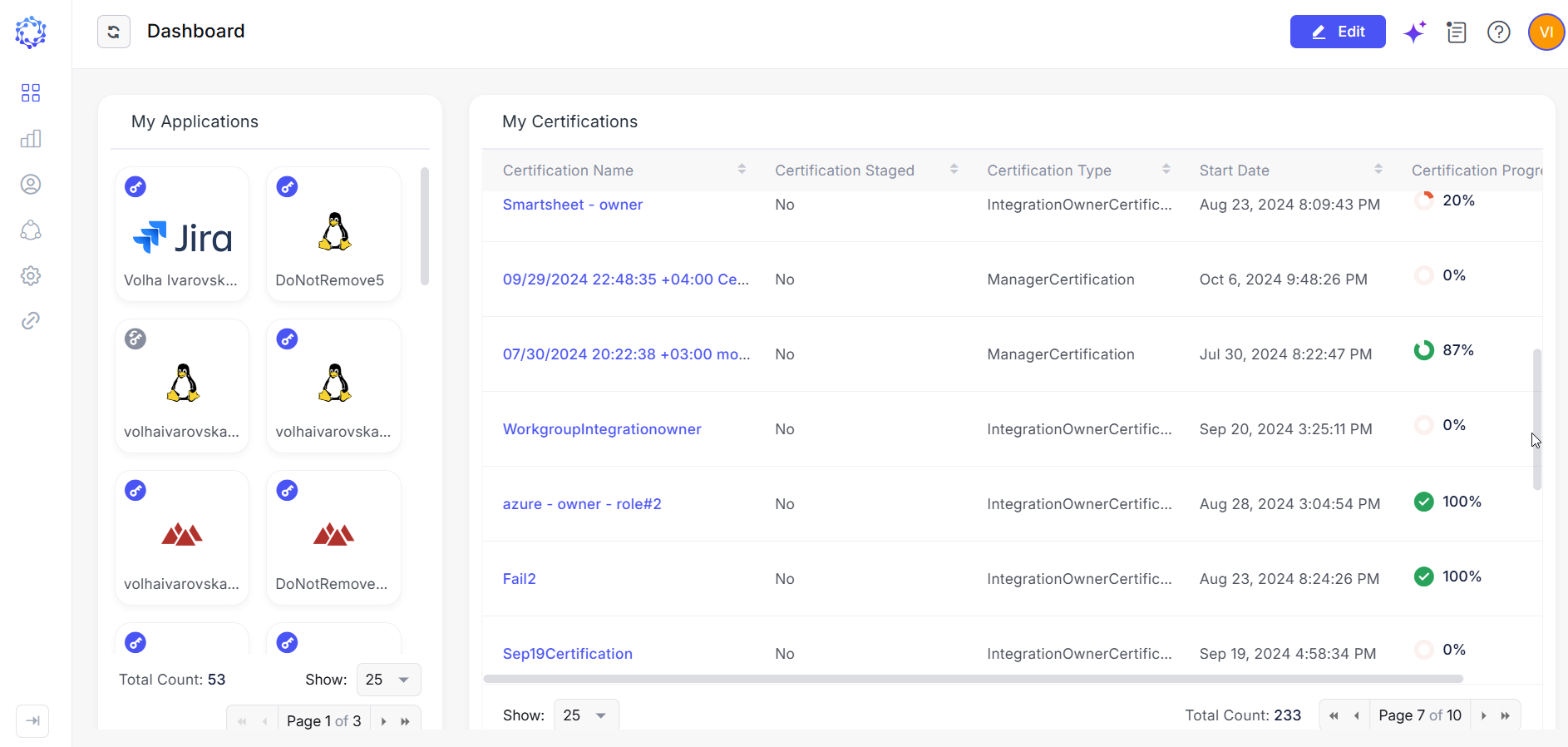 New Dashboard widgets
Certification History
Certifications now include a dedicated History tab that provides a chronological record of events and changes associated with a certification.
-
The history captures activities performed throughout the certification lifecycle, providing visibility into how the certification and the access under review have changed over time. This enhancement improves traceability of certification activities and provides administrators and auditors with historical context for reviewing access decisions, investigating changes, and supporting audit and compliance activities.
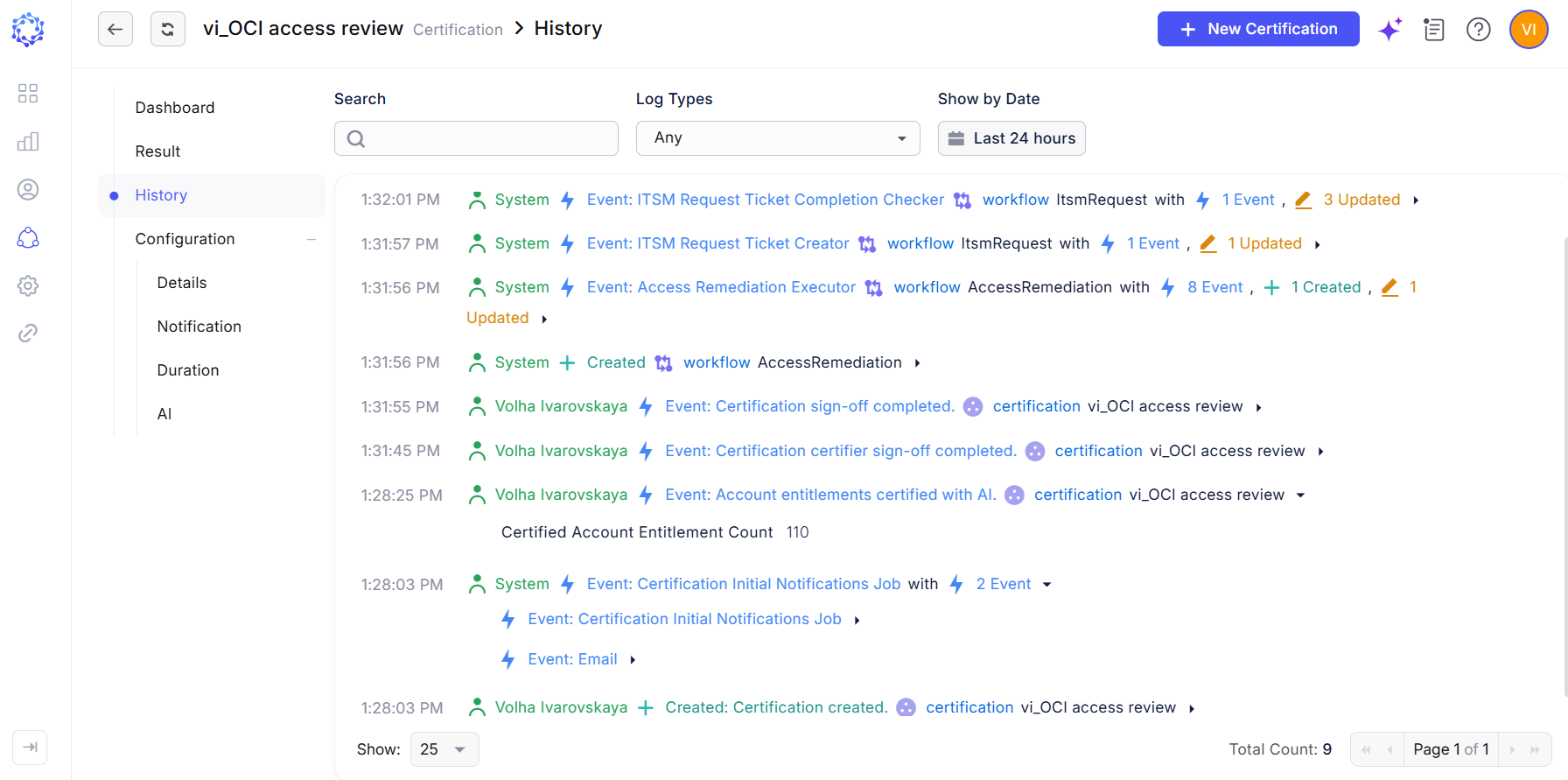 Certification History
Affected Components & Modules
- ObserveID SSO
- Remote Connect
- Local Authentication
- MFA
- Permanent Access Request
- ITSM request
- ServiceNow ITSM integration
- NHI accounts
- Integration configuration
- Identity Accounts
- Dashboard
- Certifications
Note:
The release will be deployed during non-business hours to minimize disruption. Downtime is expected to be less than five minutes, and users are unlikely to experience any noticeable interruption.
References & Support
For detailed instructions or additional technical assistance, please contact your ObserveID support representative at [email protected].
Thank you for choosing ObserveID!